
Better software through SAST (Static Application Security Testing)
Security in software development is not an optional feature - it is a basic requirement. Nevertheless, experience shows time and again that security vulnerabilities are often only discovered late in the development process or even during operation. At this stage, rectification is not only time-consuming but also expensive. A report from 2002 already documents this: The later an error is found in the software development lifecycle, the higher the cost of rectifying it - in the worst case, many times higher than what an early correction would have cost.
This is exactly where Static Application Security Testing - SAST for short - comes in. SAST allows you to automatically check your source code for security vulnerabilities before the application is even executed. This shifts the security check to where it has the greatest added value: directly in the development process.
In this article, you will get a structured overview of what SAST is, how it works technically, which vulnerabilities it detects - and where its limitations lie. We will also show you how you can integrate SAST into your day-to-day development work in a meaningful way.
This article is aimed at developers who want to improve their code quality and security in a targeted manner, as well as team leads and project managers who want to integrate security processes into their development workflow in a structured way. IT managers in companies who are coming into contact with the topic of application security for the first time will also find a practical introduction here.
What is SAST? - Definition
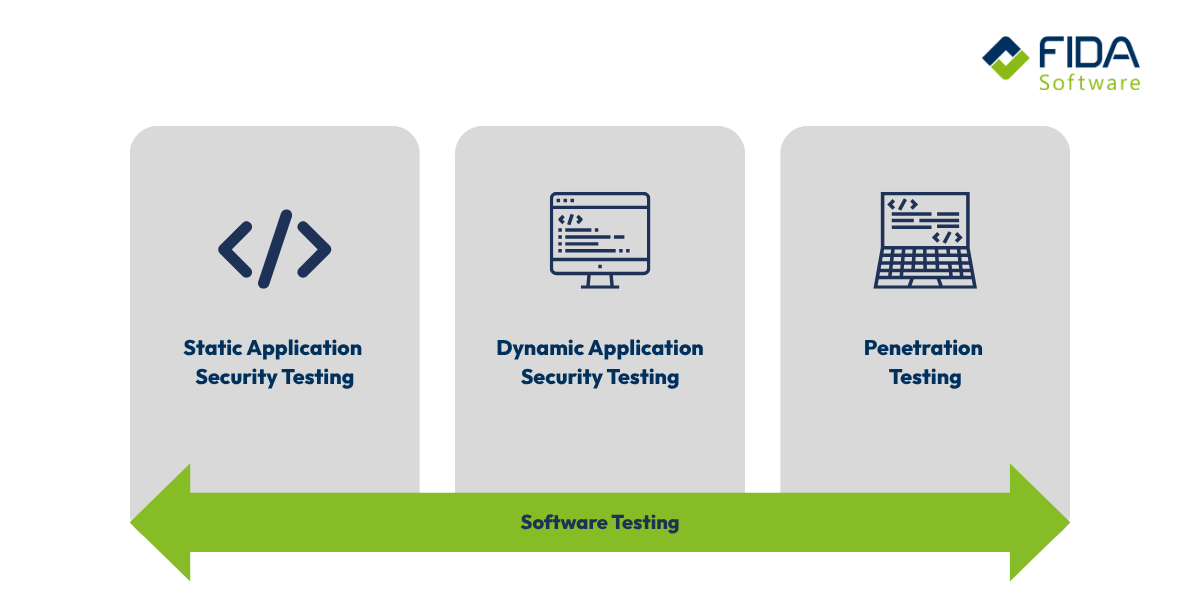
Static Application Security Testing, or SAST for short, is a method for the automated security analysis of software. The source code, bytecode or binary code of an application is examined for vulnerabilities - without the software having to be executed. This is also referred to as white-box testing: the analysis tool has complete insight into the code and evaluates its structure and logic directly.
SAST usually takes place during the development phase and provides you with information on security-critical areas directly where they arise - in the code itself.
What distinguishes SAST from DAST and SCA?
SAST is not the only method in the field of application security testing. Two other methods are frequently used in this context:
What is DAST (Dynamic Application Security Testing)?
DAST tests an application during operation - i.e. from the outside, without looking into the source code. DAST simulates the behavior of an attacker and traces possible attacks on the running application from this perspective by checking how the application reacts to inputs. In contrast to SAST, DAST only comes into play later in the development process, namely when the application is already deployable.
What is SCA (Software Composition Analysis)?
SCA does not focus on self-written code, but on integrated third-party libraries and open source components. SCA checks whether known vulnerabilities (CVEs) are present in the dependencies used.
In a nutshell: SAST analyzes the code you write. DAST tests the running application from the outside. SCA checks the dependencies you are relying on. In practice, all three methods complement each other and together form a solid basis for a holistic security strategy. Are you looking for experts to support you in the area of SAST? Then you've come to the right place!
How does SAST work?
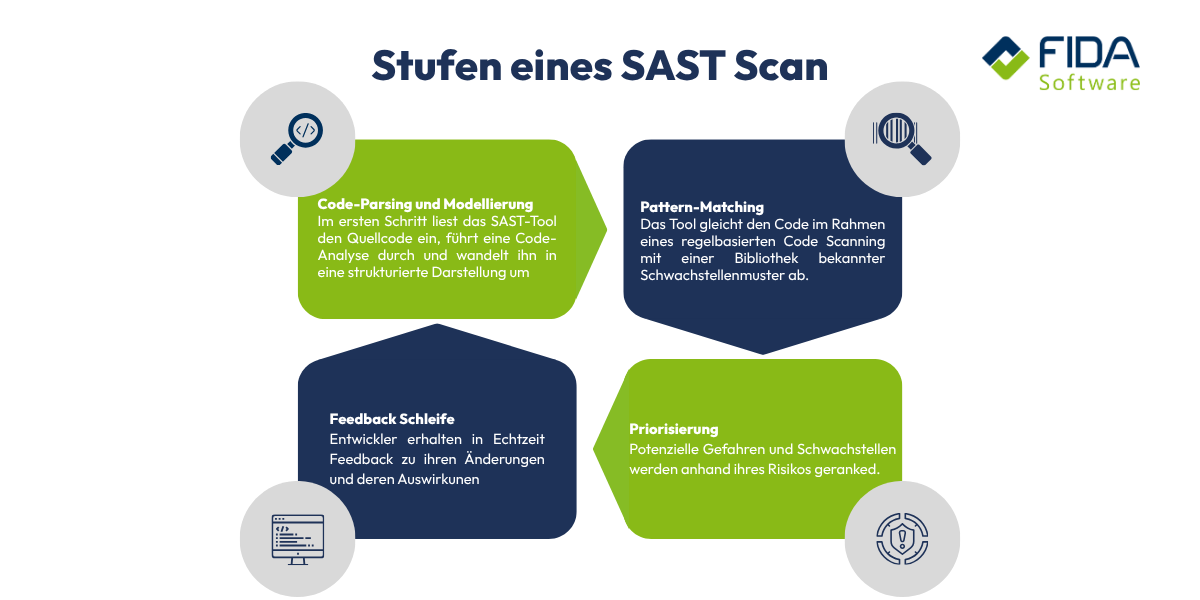
In order for SAST to fulfill its purpose, a multi-stage analysis process runs in the background. In simplified terms, this can be divided into four steps:
Step 1: Code parsing and modeling
In the first step, the SAST tool reads in the source code, performs a code analysis and converts it into a structured representation - the so-called Abstract Syntax Tree (AST). The AST is a tree structure that depicts the logical structure of the code: What functions are there? How are variables defined? How are components related to each other? This representation enables the tool to understand the code not just as text, but as a structured model.
Step 2: Data flow analysis
Based on the AST, the tool uses data flow analysis to track how data flows through the application - from its source to its destination. It examines which variables reach which functions and whether security-critical points are passed, which supports the detection of insecure data paths, such as SQL injection.
Step 3: Taint analysis
Taint analysis is an extension of data flow analysis. All data that originates from untrustworthy sources - such as user input from a form - is marked as "tainted". The tool then traces this data through the entire code. If such a data element ends up unfiltered in a security-critical function, for example a database query, the tool sounds an alarm.
Step 4: Pattern matching and rule application
At the same time, the tool compares the code with a library of known vulnerability patterns - such as the OWASP Top 10 - as part of a rule-based code scanning process. This ensures that common error patterns such as SQL injection or cross-site scripting are reliably detected.
At the end of the process, there is a report that classifies the vulnerabilities found according to severity, names their exact location in the code, often highlighting the specific line of code that causes the vulnerability, and provides advice on how to fix it. Our developers accompany you through all steps of the SAST process
How can SAST be integrated into the development process - Shift Left Security
In the traditional software development process, security was often seen as the last step - a final audit shortly before go-live. This approach has a decisive disadvantage: the later a vulnerability is discovered, the more time-consuming and expensive it is to rectify.
The Shift Left principle reverses this approach. "Shift left" means anchoring security checks as early as possible in the software development lifecycle (SDLC) - i.e. during the writing of code, not just during the testing or deployment process. SAST is a central tool for this, as it can analyze code without the application having to be executed - even incomplete code can be scanned.
Integration in CI/CD pipelines
In practice, SAST is integrated directly into the CI/CD pipeline and DevSecOps pipelines. This means that a scan is automatically performed for every commit or pull request. Security problems are reported back as real-time feedback immediately after code updates, before new code flows into the main branch. In addition, SAST can be integrated directly into common development environments (IDEs) as a plugin, so that developers are already made aware of possible vulnerabilities when writing the code and this early transparency supports the speed of development without slowing down the workflow significantly.
This approach ensures that security does not remain a downstream process, but becomes an integral part of the daily development workflow.
What does SAST recognize and what does it not?
SAST is a powerful tool, but not a panacea. To use it effectively, it is important to know where its strengths lie - and where its limits are.
What SAST reliably recognizes:
SAST is particularly strong at uncovering vulnerabilities that are directly embedded in the code. These typically include:
SQL injection: User input that flows unfiltered into database queries
Cross-site scripting (XSS): Unvalidated input that can be executed in other users' browsers
Buffer overflows: Missing checks during the processing of input data
Hardcoded access data: Passwords or API keys that are directly in the source code
Insecure deserialization: Incorrect processing of serialized data
Path and command injections: Inputs that flow uncontrolled into file system or system operations
Essentially, SAST covers the majority of the OWASP Top 10 - i.e. the vulnerability categories that occur most frequently in practice and are the most dangerous.
Where SAST reaches its limits
As helpful as SAST is, there are areas where it naturally cannot help:
False positives are one of the more well-known problems. Since SAST statically analyzes the code without knowing the actual execution context, it sometimes reports vulnerabilities that do not pose a risk in reality. Without careful configuration and post-processing, this can lead to considerable noise in the test result. If real findings remain untreated, they can also facilitate cyber attacks.
Runtime errors remain invisible to SAST. Errors that only occur due to certain inputs or system states at runtime cannot be detected without executing the application - DAST is the more suitable tool here.
Complex business logic errors also elude static analysis. SAST cannot assess whether an application functions correctly or whether an authorization logic fails in a specific scenario.
SAST therefore provides you with valuable and early indications of code-based vulnerabilities - but does not replace manual code reviews or supplementary tests such as DAST or penetration tests, because it only covers part of the necessary security checks. FIDA provides you with the right experts to ensure that your code does not ultimately reveal any vulnerabilities.

Overview of well-known SAST tools
The market for SAST tools is broadly based - from free open source solutions to extensive enterprise platforms. The following overview gives you an initial point of orientation, without claiming to be exhaustive:
SonarQube is one of the best known and most widely used tools in the field of static code analysis. It combines code quality and security in one platform and is suitable for both smaller teams and enterprise environments. SonarQube is discussed in more detail in the next section.
Semgrep is a fast, developer-friendly SAST tool with a special approach: rules are written in YAML and look similar to the code they are looking for - this makes creating your own rules particularly accessible. The Community Edition is free and a good starting point for many teams.
Checkmarx is a commercial enterprise solution that bundles SAST, DAST, SCA and other security functions in one platform. It is primarily aimed at large organizations with complex compliance and governance requirements.
OpenText Fortify is regarded as one of the market leaders in the enterprise segment and offers particularly deep language support as well as extensive compliance reporting functions. The implementation effort is higher compared to other tools, which makes Fortify particularly relevant for regulated industries and authorities.
CodeQL is the SAST tool from GitHub and is available free of charge for public repositories. It offers semantic code analysis and is particularly tightly integrated into GitHub workflows.
Choosing the right tool depends on factors such as team size, programming languages used, budget and compliance requirements. For many teams - especially in SMEs - SonarQube is a sensible starting point, as it offers a good compromise between functionality, integrability and entry barrier. Are you unsure which tool is right for your project or company? No problem, our experts will be happy to help you!
How does SAST work with SonarQube?
SonarQube originally started out as a tool for improving code quality and has evolved over time into a fully-fledged SAST platform. Today, according to the manufacturer, it is used by over 7 million developers and more than 400,000 companies worldwide. At FIDA, we use SonarQube for internal projects and support companies in the introduction and operation of SonarQube.
What does SonarQube analyze?
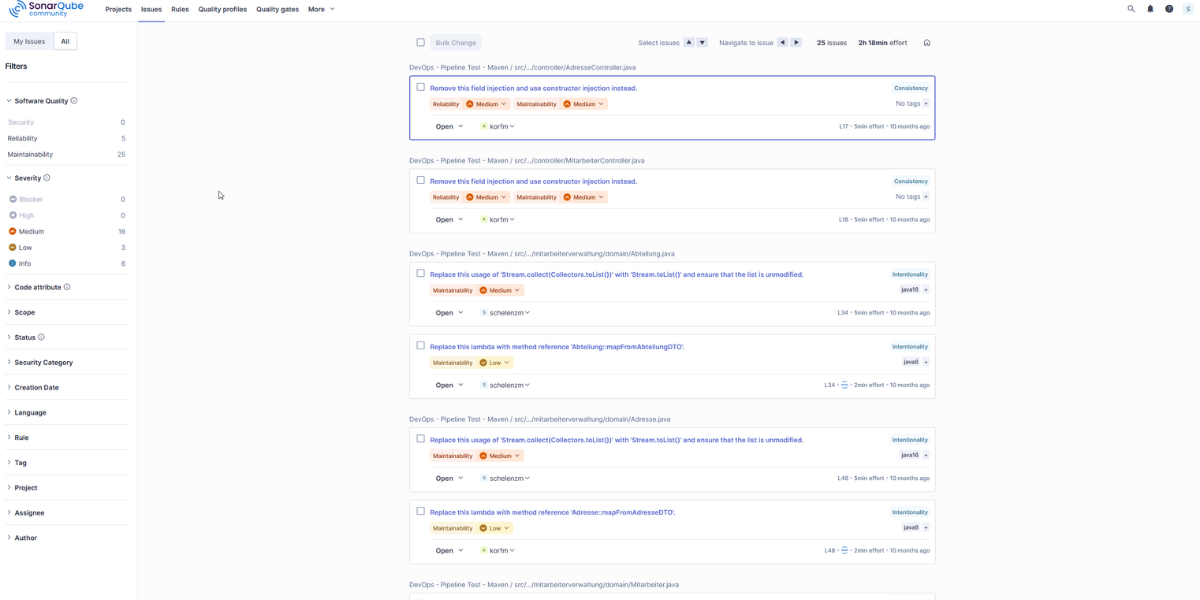
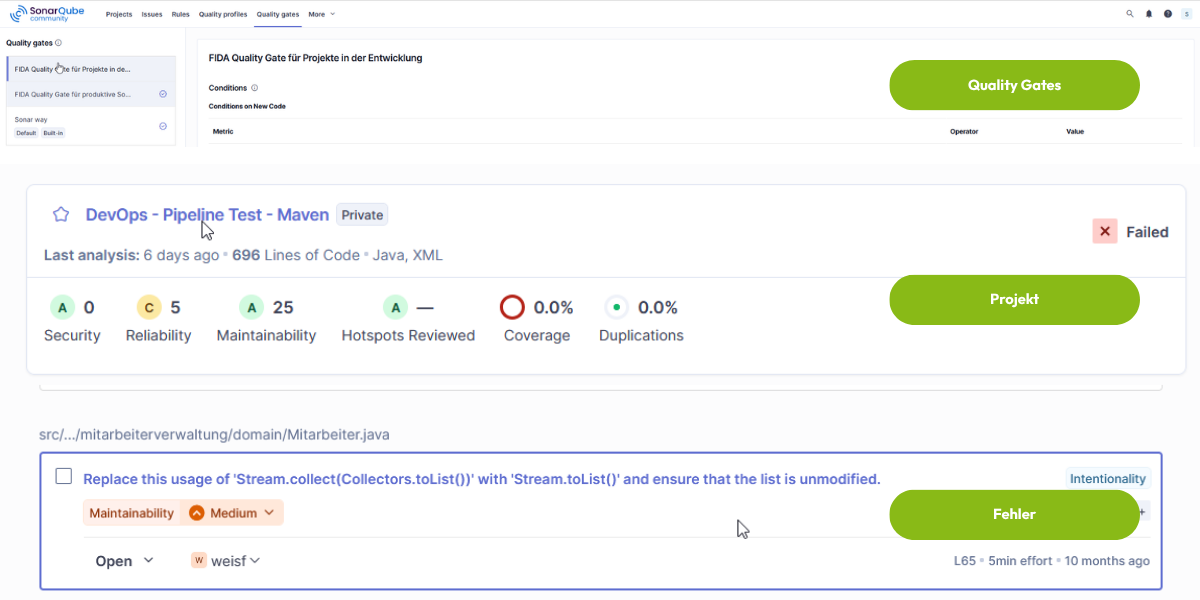
SonarQube analyzes source code for three categories of problems: Security gaps (vulnerabilities), code smells - i.e. structural weaknesses that impair maintainability - and bugs. Java, JavaScript and PHP, among others, are supported. For security analysis, SonarQube relies on its own SAST engine, which uses data flow analysis and taint tracking, among other things, to detect vulnerabilities such as SQL injection, XSS or the inadvertent disclosure of secrets in the code. The rule library comprises over 6,000 check rules for more than 35 programming languages.
What are quality gates?
A central concept in SonarQube are so-called quality gates - definable threshold values that determine when a build is considered "passed". For example, you can specify that a pull request may only be merged into the main branch if no new critical security vulnerabilities have been introduced. This turns security into a measurable, automatically enforced quality criterion in the development process.
How can SonarQube be integrated into the development workflow?
SonarQube can be integrated into everyday development on several levels. Using the SonarLint plugin, developers receive direct feedback in their IDE - even before code is committed. SonarQube can also be integrated into all common CI/CD systems, including Jenkins, GitLab CI, GitHub Actions and Azure DevOps. Each commit or pull request automatically triggers a scan, the results of which are directly visible in the code review.
How do I introduce SAST successfully?
The decision to use a SAST tool is just the beginning. To ensure that the introduction works in practice and the tool is actually used, there are a few points to consider.
Choose the right tool
Not every SAST tool is suitable for every team. Relevant selection criteria include the supported programming languages and frameworks, the ability to integrate into existing CI/CD and IDE environments and the budget. For many teams, a proof of concept is recommended: the tool is first tested on a real sub-project before a broader introduction takes place.
Start small, expand step by step
A complete SAST introduction at once rarely makes sense. A step-by-step approach is better: first set up a scan on one project, evaluate the results, adapt the rules - and then gradually include other projects. In this way, you avoid overwhelming the team with a flood of messages right from the start.
Actively reduce false positives
One of the biggest acceptance problems with SAST is alert fatigue: if developers receive too many alerts, the majority of which are irrelevant, they will start to ignore results - including real vulnerabilities. According to industry surveys, unconfigured SAST tools produce false positive rates of 30 to 60 percent. With targeted configuration and customized rule sets, this figure can be reduced to 10 to 20 percent. It is worth the effort: the more precise the results, the higher the acceptance in the team.
Involve the development team
SAST only works sustainably if developers understand the results and find them helpful. This means: training on common types of weaknesses, clear internal guidelines on how to deal with scan results and a shared understanding of which findings are classified as critical. SAST should not be perceived as a control instrument, but as a tool that makes your own work easier.
Define clear processes
Determine which vulnerability categories automatically block a build and which are initially only reported. Quality gates - such as those offered by SonarQube - help to technically enforce these rules without unnecessarily slowing down the development flow.
Our experts will guide you through every step of the introduction of SAST in your project!
Implementing SAST with FIDA
The introduction of SAST is more than a technical decision - it is an organizational one. Which tool fits your stack? How do you integrate scans into your CI/CD pipeline in a meaningful way? How do you create acceptance in the development team and reduce false positives to a manageable level?
These are precisely the questions that FIDA addresses. As an experienced consulting and software company with over 30 years of project experience in software development, we support companies not only in the selection of tools, but also in the sustainable integration of security processes into the entire development lifecycle. Whether you are an insurance company, a public sector organization or a medium-sized company - we know the specific requirements of your industry and work with you to develop a security strategy that fits your processes.
Would you like to introduce SAST in your company or put your existing security processes to the test? Talk to us - we look forward to the exchange.
Frequently asked questions about SAST
Both methods analyze source code for errors and vulnerabilities - but in very different ways. A manual code review is carried out by a human who reads, evaluates and comments on the code. SAST, on the other hand, is an automated process: a tool systematically searches the code for known vulnerability patterns without a human having to manually check each section of code. Both approaches have their merits. SAST is faster, scales with the scope of the code and runs consistently with every commit. A manual code review, on the other hand, can bring in contextual knowledge and detect logic errors that remain hidden from an automated tool. In practice, both methods complement each other.
There is currently no general legal obligation to use SAST. However, various compliance frameworks and security standards explicitly refer to static code analysis as a recommended or required measure. For example, frameworks such as PCI-DSS and ISO 27001 reference the OWASP guidelines, which include SAST as part of secure software development. With the EU Cyber Resilience Act (CRA), which is gradually coming into force, requirements for the security of software products are also becoming more of a legal focus. For companies in regulated industries - such as insurance companies or the public sector - the use of SAST is therefore increasingly not only recommended, but in fact necessary in order to meet audit requirements.
This depends heavily on the tool, the code base and the scope of the analysis. Modern tools designed for developers, such as Semgrep, are known for their speed and scan many projects in seconds to a few minutes. Heavier enterprise tools such as Fortify or Checkmarx take significantly longer for large code bases - sometimes several hours. In practice, an incremental approach is recommended: with each commit, only the changed code is scanned; a complete scan of the entire code base is carried out less frequently, for example at night or before a release.
Yes, basically yes. Most modern SAST tools support a wide range of programming languages - even older ones. However, the older and more unstructured the code, the higher the false positive rate usually is, because the tool is not fully aware of the specific context of outdated frameworks and libraries. Before implementation, it is worth checking whether the selected tool officially supports the languages and frameworks used in the legacy system. A targeted pilot project on a section of the legacy code helps to set realistic expectations.
Yes - and SAST can be particularly valuable for smaller teams because they often don't have dedicated security specialists. With a free tool such as SonarQube Community Edition or Semgrep, a SAST scan can be set up with manageable effort. Getting started doesn't have to be difficult: Even a single scan in the CI pipeline that reports critical vulnerabilities delivers immediate added value. The effort required for configuration and maintenance can be expanded step by step.
A SAST scan usually provides a list of findings, classified according to severity - from critical to low. The following procedure is recommended: First prioritize all critical and high findings and check for actual relevance - not every finding is automatically a real security risk. Then fix the confirmed vulnerabilities and run the scan again to verify the fix. Findings that are classified as false positives should be documented and marked accordingly in the tool so that they do not unnecessarily affect future scan results. In the long term, SAST results should be discussed regularly as a team in order to develop a shared awareness of security.
This is an increasingly relevant question. AI-generated code - for example from GitHub Copilot or similar tools - is subject to the same vulnerability patterns as manually written code. SAST analyzes the code as such, regardless of whether it originates from a human or an AI. Sonar, for example, explicitly advertises SonarQube as suitable for analyzing AI-generated code. Since AI assistants occasionally produce unsafe code patterns, the automated scan with SAST is a useful control mechanism, especially in projects that rely heavily on AI code generation.
The basic rule is: as early and as often as possible. The following model has proven itself in practice: With every commit or pull request, an incremental scan of the changed code is carried out. In addition, a complete scan of the entire code base is initiated regularly - for example, daily or weekly - in order to take into account creeping problems or newly added rules. Before each release, a final scan is recommended as a quality gate before code goes into production.
The costs depend heavily on the tool selected and the implementation effort. On the tool side, there are both completely free open source solutions (SonarQube Community Edition, Semgrep Community) and commercial products, the prices of which vary considerably depending on the size of the company and the range of functions. Added to this is the internal effort required for setup, configuration, training and ongoing maintenance. For many teams - especially in SMEs - starting with a free tool is realistic and sensible. Those planning a more comprehensive introduction or who need to meet specific compliance requirements will benefit from an accompanied implementation, as offered by FIDA.


