
Databricks vs. Snowflake: Welche Datenplattform passt zu deinem Unternehmen?
A medium-sized machinery manufacturer is planning a new reporting system for its production data. The IT department requests two proposals: one for Snowflake and one for Databricks. Both providers promise lower costs, better performance, and greater flexibility. By the end of the discussions, the confusion is greater than before. This is exactly the situation many companies currently find themselves in as they seek to modernize their data infrastructure.
Databricks and Snowflake are among the leading platforms in modern data management. Both process massive amounts of data, both tout AI capabilities, and both claim to be suitable for nearly every use case. But what does that actually mean for your decision? This article compares Databricks and Snowflake based on the criteria that really matter in practice: architecture, pricing model, total cost of ownership, performance, and use cases.
Databricks vs. Snowflake: Why Is This Decision So Important?
Choosing a data platform is no longer just an IT decision. It determines how quickly your company can respond to market changes, how effectively business units can work with data, and how high the ongoing costs for data engineering, analytics, and AI projects will be. While a wrong decision can be corrected later, migrating between platforms is time-consuming and expensive.
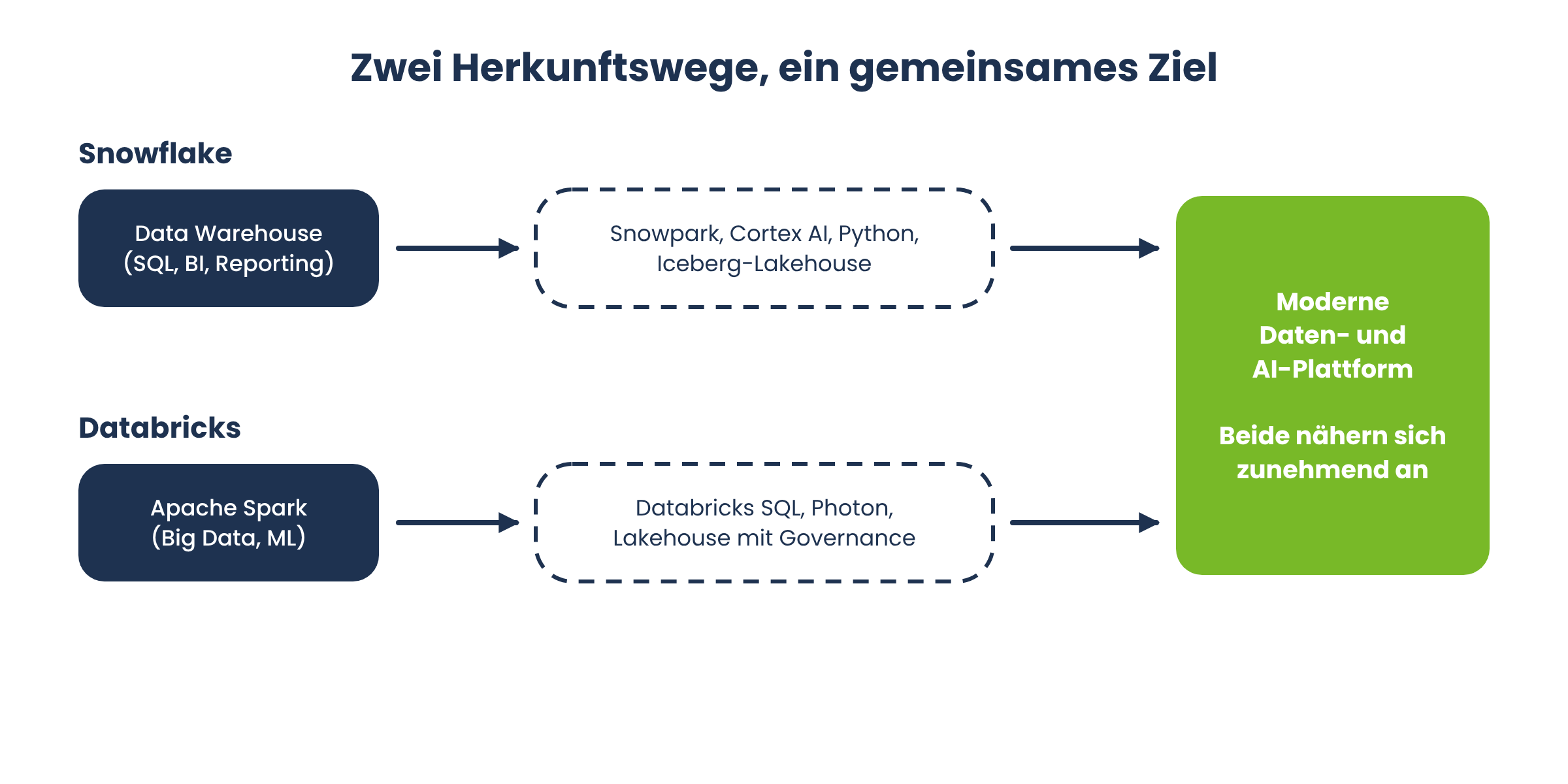
Both platforms have converged significantly in recent years. With Snowpark, Cortex AI, and support for Python workloads, Snowflake has expanded into areas traditionally dominated by Databricks. Databricks, in turn, has built a solution for traditional SQL analytics—which has historically been Snowflake’s strength—with Databricks SQL and Photon. For companies, this means that a superficial glance at marketing materials is no longer sufficient.
What exactly are Databricks and Snowflake?
Before you compare Databricks and Snowflake, it’s worth taking a look at the basics. Both terms are often used interchangeably in everyday business to refer to a “modern cloud data platform,” even though they take technically different approaches.

What is Snowflake?
Snowflake is a cloud-based data platform that was originally developed as a data warehouse. By technically separating storage and compute, both resources can be scaled independently of one another. While Snowflake was initially used primarily for SQL-based analytics, BI, and reporting, the platform now also supports semi-structured and unstructured data as well as lakehouse architectures, such as those based on Apache Iceberg. In addition, Snowflake offers features for AI and machine learning applications, thereby increasingly evolving from a traditional data warehouse into a comprehensive data and AI platform.
What is Databricks?
Databricks originated from the open-source Apache Spark project and follows the so-called “lakehouse” approach. A data lakehouse combines the flexibility of a data lake—where unstructured data such as images, log files, or sensor data can be stored—with the structure and governance of a traditional data warehouse. Databricks is heavily focused on big data, streaming, and machine learning, and offers native support for Python, Scala, R, and SQL.
Databricks and Snowflake at a Glance: The Key Differences
At first glance, both platforms seem interchangeable: cloud-based, elastically scalable, with SQL access and AI capabilities. Upon closer inspection, however, clear differences emerge:
Origins: Snowflake comes from the data warehouse world, while Databricks comes from the big data and machine learning world.
Data Types: Snowflake and Databricks process both structured and unstructured data.
Pricing Model: Snowflake charges in credits, while Databricks charges in Databricks Units (DBUs).
Target Audience: Snowflake primarily appeals to business analysts with SQL skills, while Databricks is geared more toward data engineers and data scientists.
Governance: Snowflake offers a native governance solution with Horizon Catalog, just as Databricks does with the Unity Catalog.
However, both platforms are continuously evolving and are increasingly adopting features from one another.
Architecture Comparison: Data Warehouse vs. Data Lakehouse
A platform’s architecture determines what it is suitable for in practice. This is precisely where the most important difference between Databricks and Snowflake lies.
How does the Snowflake architecture work?
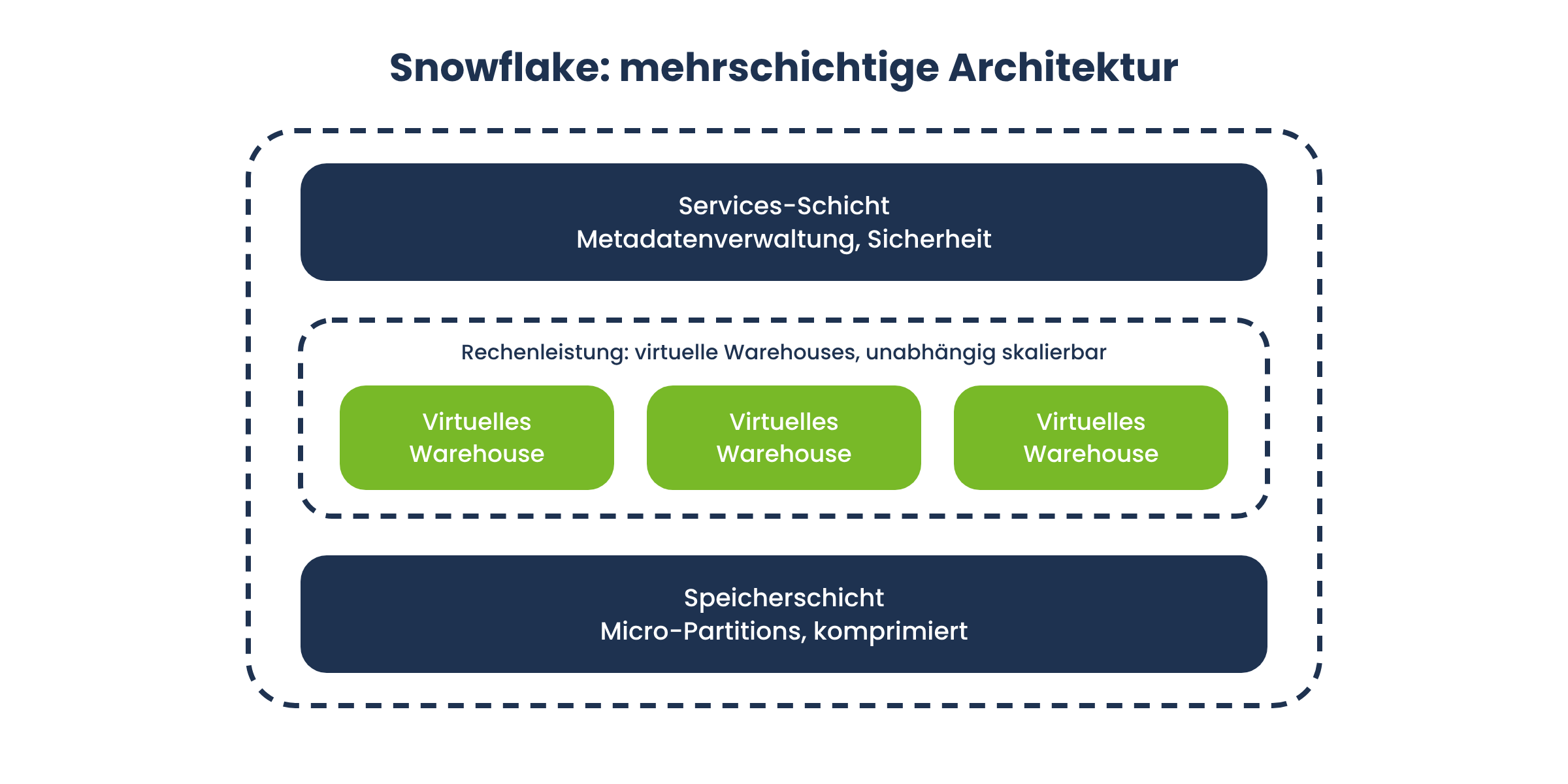
Snowflake uses a multi-tier architecture with separate layers for storage, computing power, and services such as metadata management and security. The data is compressed and stored in so-called micro-partitions—small, automatically managed storage units that Snowflake optimizes for efficient querying. For computational operations, Snowflake uses virtual warehouses—isolated computing clusters that can be scaled independently of one another.
How does the Databricks Lakehouse architecture work?
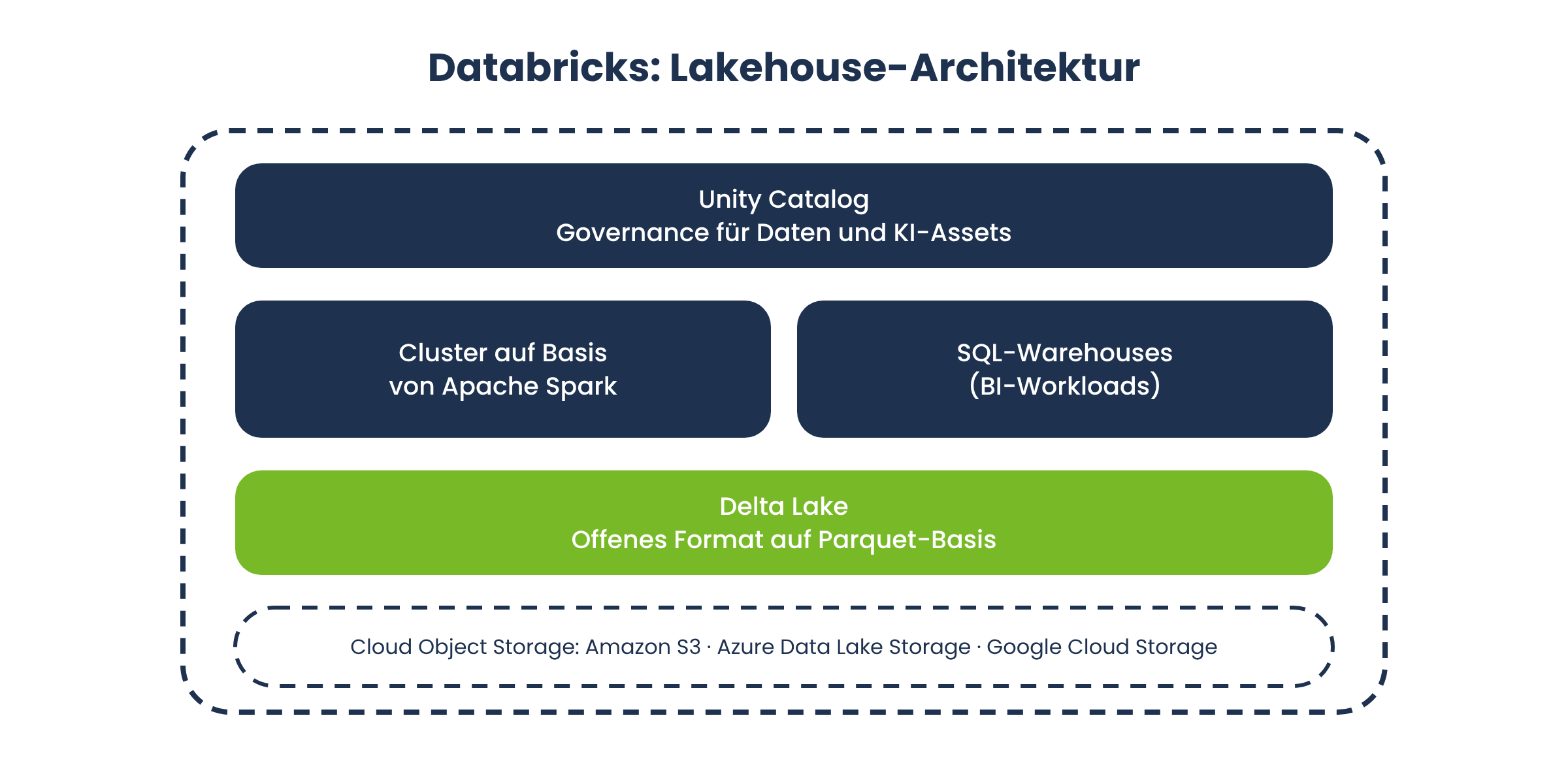
Databricks stores data as Delta Lake tables (based on Parquet) directly in a cloud object storage service such as Amazon S3, Azure Data Lake Storage, or Google Cloud Storage. Computational operations run on clusters based on Apache Spark or on SQL warehouses for BI workloads. Because the data is stored in open formats and in the company’s own cloud storage, the company retains control over its data infrastructure to a large extent.
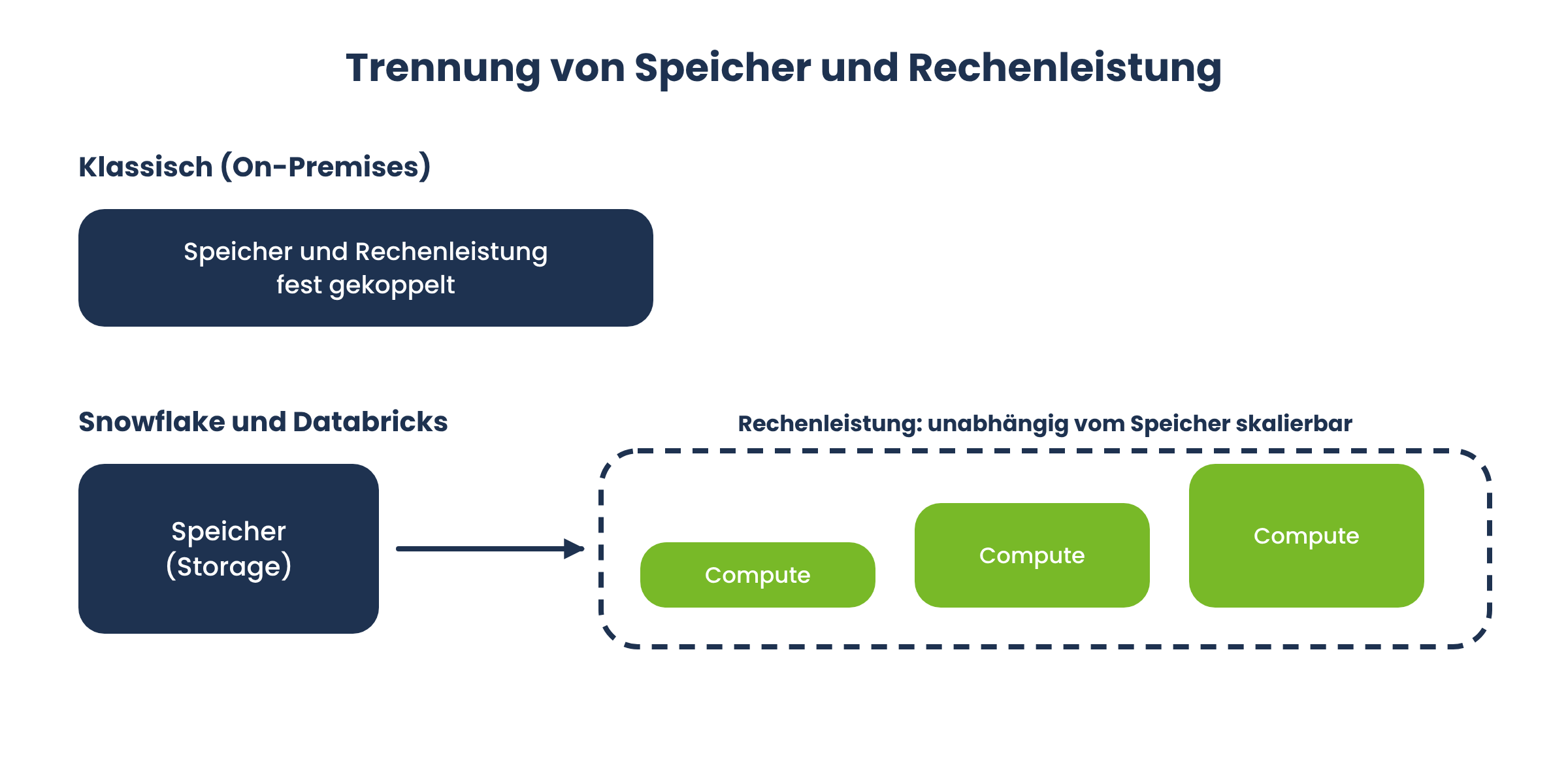
What does the separation of storage and compute mean?
Both platforms separate storage and computing power. This is a key advancement over traditional on-premises systems, in which the two components were tightly coupled.
Pricing Models in Detail: How Do Snowflake and Databricks Calculate Their Costs?
A comparison based solely on list prices doesn’t tell the whole story. Both providers use usage-based pricing models, in which actual costs depend heavily on individual workloads. If you don’t understand both pricing models, you can quickly make an expensive mistake.
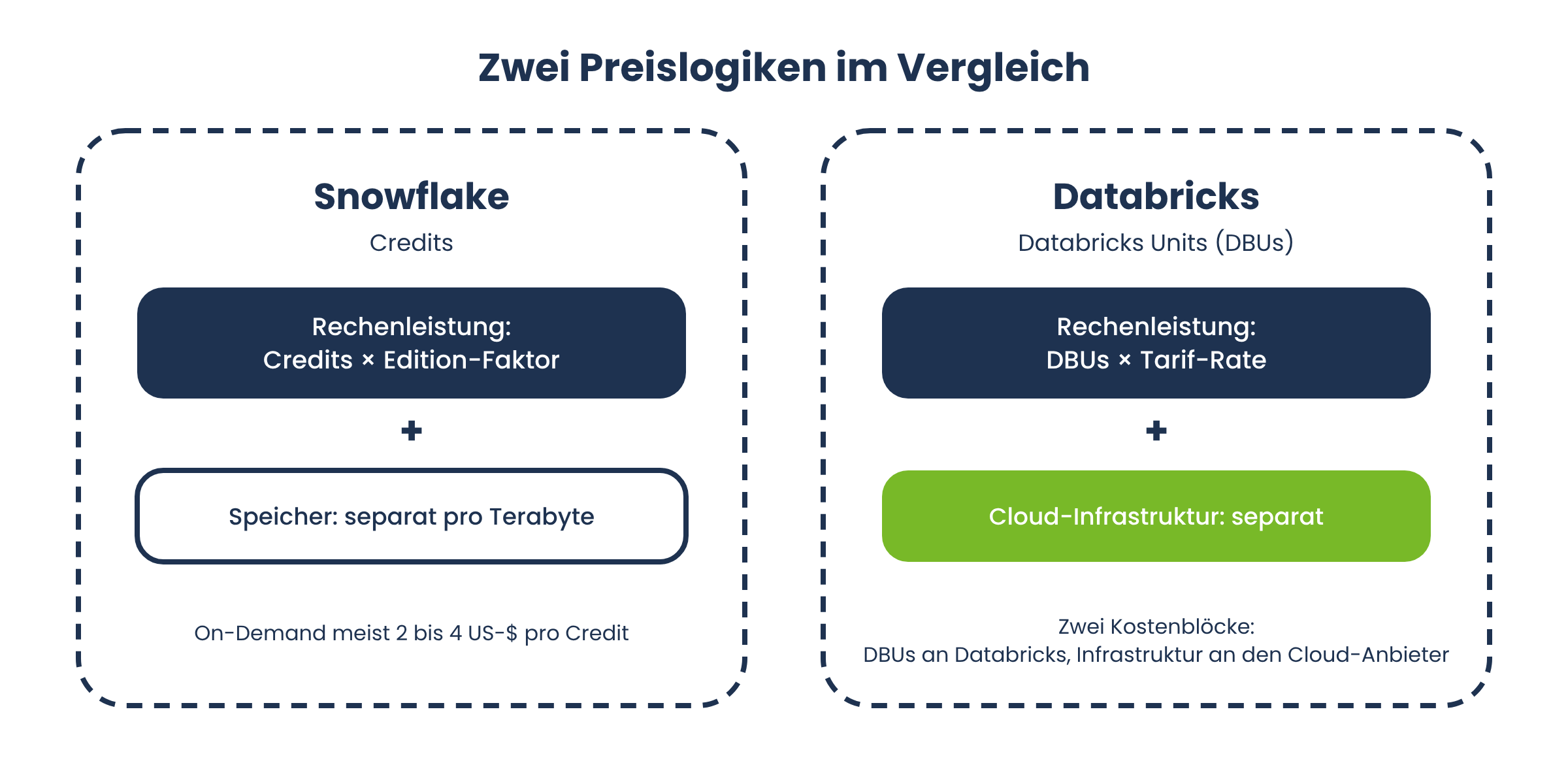
How does Snowflake's credit-based pricing model work?
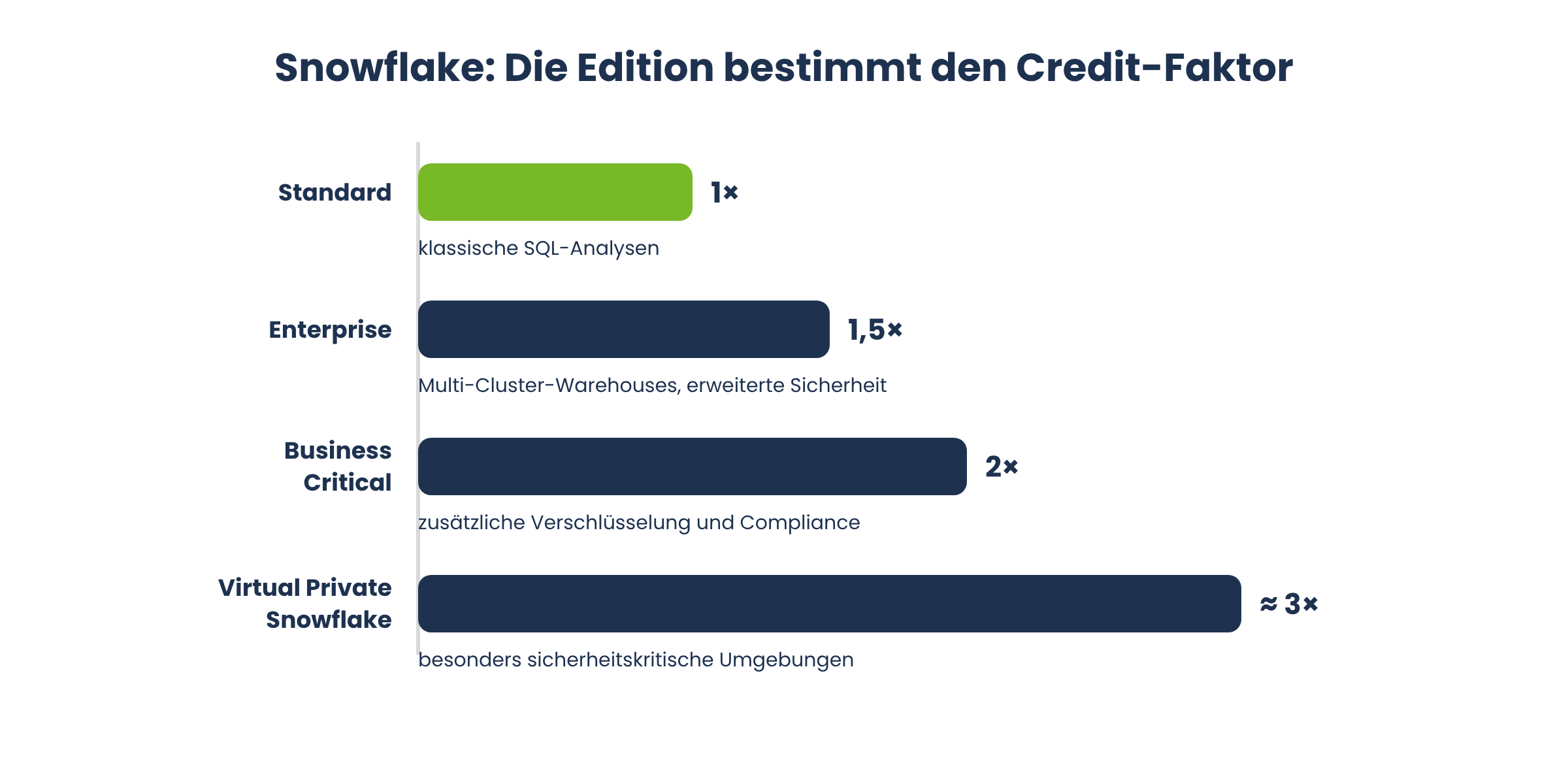
Snowflake uses a credit-based pricing model for computing resources. One Snowflake credit is equivalent to one hour of computing power for a virtual warehouse of the smallest size. Depending on the edition, this base price is multiplied by a factor:
Standard: Base factor 1×, for classic SQL analytics.
Enterprise: Factor of 1.5×, including multi-cluster warehouses and advanced security features.
Business Critical: Factor of 2×, with additional encryption and compliance features.
Virtual Private Snowflake: Factor of approximately 3×, for environments with particularly high security requirements.
For on-demand usage, the price per credit is typically between 2 and 4 euros, depending on the cloud provider and region. With pre-booked capacity, the effective price drops significantly (Software Pricing Guide).
What are Databricks Units (DBUs) and how are they calculated?
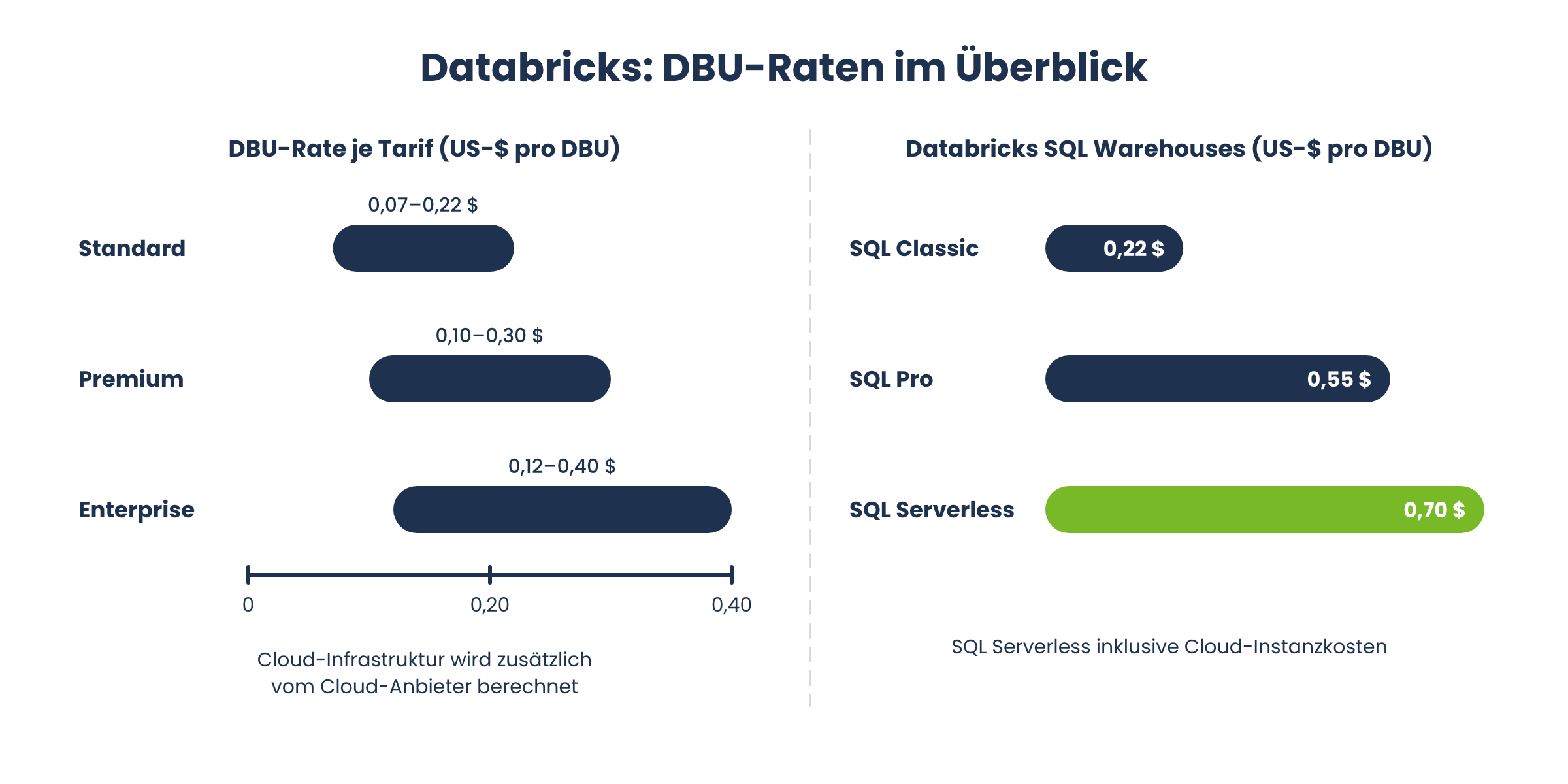
Databricks uses Databricks Units (DBUs) for pricing. A DBU measures the compute capacity consumed per hour. Consumption varies depending on the cluster type and workload. The cost per DBU also varies depending on the pricing plan:
Standard: approximately €0.06 to €0.20 per DBU.
Premium: approximately €0.09 to €0.27 per DBU, including role-based access control and audit logs.
Enterprise: approximately €0.11 to €0.36 per DBU, including Unity Catalog and advanced governance.
Databricks SQL Warehouses, the platform’s BI query layer, have their own DBU rates:
SQL Classic: approximately €0.20 per DBU.
SQL Pro: approximately €0.49 per DBU.
SQL Serverless: approximately €0.62 per DBU, including cloud instance costs.
The euro prices listed are based on an assumed exchange rate of 1 U.S. dollar = 0.89 € and are rounded approximations. Actual costs may vary depending on the cloud provider, configuration, workload, and any applicable discounts. Value-added tax (VAT) and exchange rate fees are not included.
Why should cloud infrastructure costs be considered separately at Databricks?
A common misconception concerns the total cost of Databricks. DBU costs vary depending on the cluster type and workload and are paid directly to Databricks. The underlying cloud infrastructure is billed separately by the cloud provider. Your monthly Databricks invoice therefore effectively consists of two cost components, which should be considered separately when negotiating with the provider (Software Pricing Guide).
How Much Does Snowflake Cost in Practice? A Sample Calculation
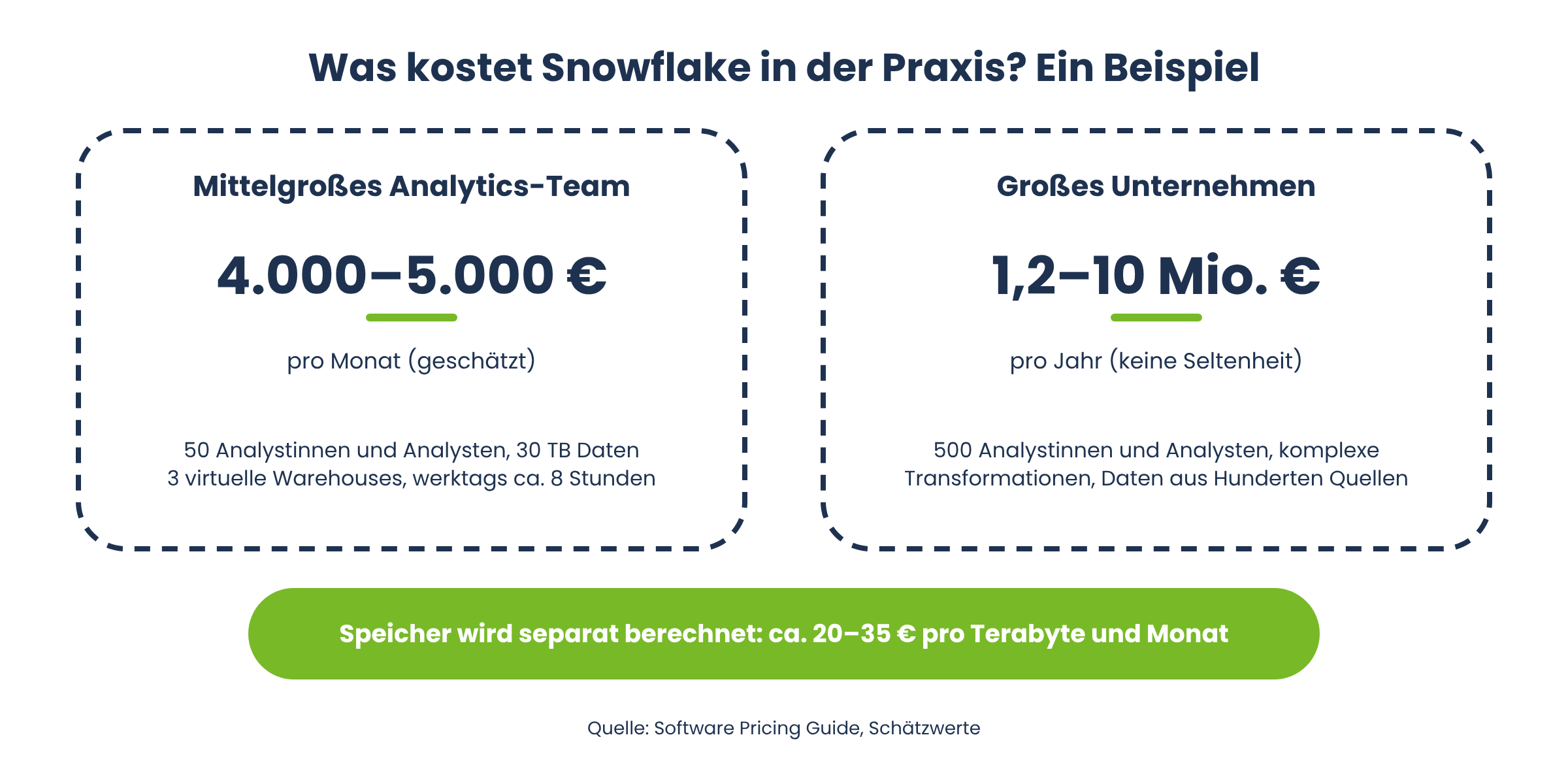
Numbers are more helpful than abstract pricing models. A medium-sized analytics team of about 50 analysts running traditional BI workloads, with 30 terabytes of compressed data and three virtual warehouses that run for about eight hours on weekdays, an estimated total cost of about 4,000 to 5,000 euros per month—or roughly 40,000 to 60,000 euros per year. If you scale this scenario up to a large enterprise with 500 analysts, complex transformations, and continuous data loads from hundreds of sources, an annual Snowflake bill of 1.2 to 10 million euros is not uncommon (Software Pricing Guide).
Storage is billed separately with Snowflake: Snowflake charges approximately 20 to 35 euros per terabyte per month, depending on the cloud provider and compression rate. Thanks to columnar compression, a typical dataset is often reduced to one-third of its original volume.
How much does Databricks actually cost?
With Databricks, it’s not possible to come up with a similarly simple cost calculation because the costs depend heavily on the workload mix: Compute jobs for automated pipelines are less expensive than all-purpose compute for interactive notebooks, and model serving for running ML models is typically billed by token or compute time. Databricks’ cost structure can be complex, especially when multiple cluster types are used intensively in parallel. Therefore, anyone who wants to realistically estimate Databricks costs should consider DBU costs, cloud infrastructure costs, and the internal effort required for cluster tuning together.
Total Cost of Ownership (TCO): Which Option Is Cheaper in the Long Run?
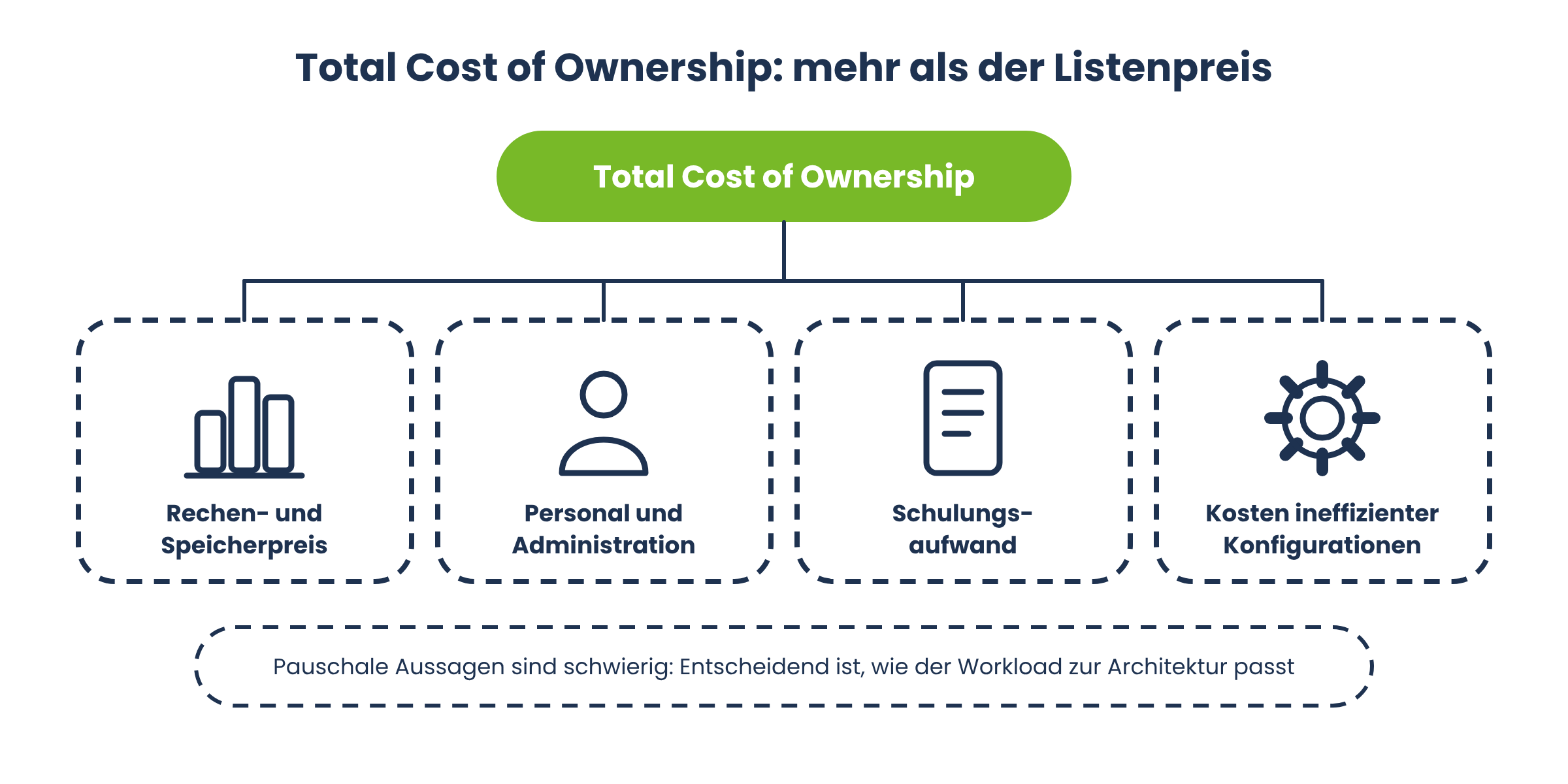
Total Cost of Ownership describes the full cost of a platform over its entire lifespan, not just the cost of computing and storage. This also includes personnel costs for administration, training expenses, and the costs associated with inefficient configurations. The decision between Databricks and Snowflake depends on specific requirements, and that is precisely what makes it so difficult to make blanket statements about TCO.
When is Snowflake more cost-effective?
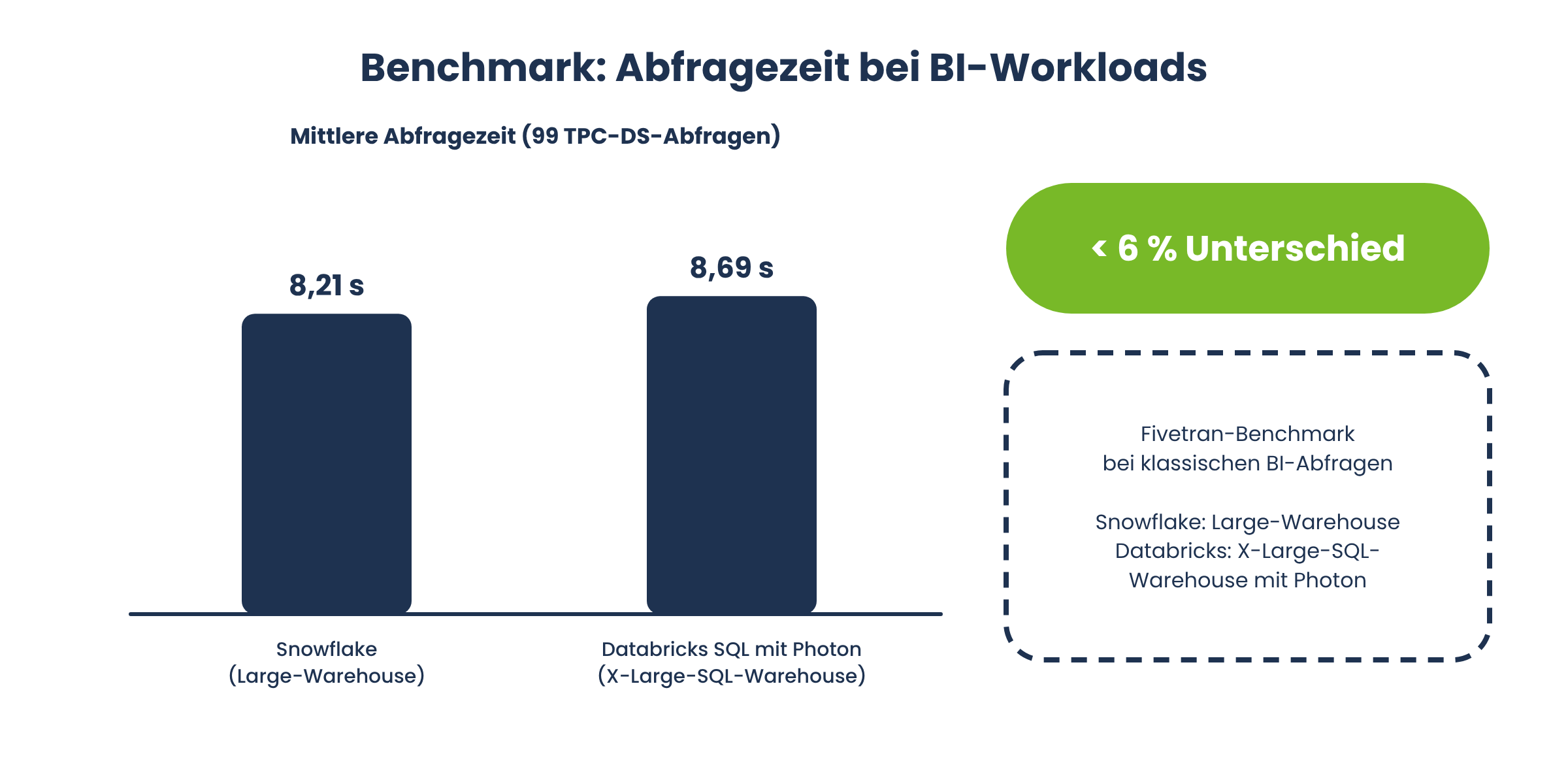
For pure SQL analytics and BI workloads, Snowflake is often the more cost-effective choice. Its concurrency model, automatic scaling, and mature query performance for large SQL workloads ensure that companies with traditional reporting needs often achieve a lower total cost of ownership with Snowflake (Software Pricing Guide). Independent benchmarks also confirm this trend: The Fivetran benchmark, based on the 99 official TPC-DS queries, found an average query time of 8.21 seconds for Snowflake on a Large warehouse, compared to 8.69 seconds for Databricks SQL with Photon on a comparable X-LargeSQL warehouse—a difference of less than 6 percent for traditional BI queries (Tech Insider).
When is Databricks more cost-effective?
For machine learning, AI, and data engineering using Python or Spark, Databricks is generally more cost-effective and powerful. Databricks can achieve a lower total cost of ownership for mixed workloads when data engineering, ETL, and machine learning are performed on the same platform, rather than integrating additional tools (Software Pricing Guide).
Why isn't a simple price comparison enough?
The list price per computing unit says little about the actual costs. What matters most is how well a workload fits the respective architecture. Here’s a real-world example: An insurance company with stable, predictable overnight SQL reports often finds Snowflake to be more cost-effective because unused data warehouses are automatically paused. In contrast, a company with continuous streaming of sensor data and model training often benefits from the flexibility of Databricks clusters.
How can the costs of both platforms be reduced?
Both providers offer significant discounts compared to on-demand usage if companies commit to long-term contracts.
Discounts and Capacity Agreements with Snowflake
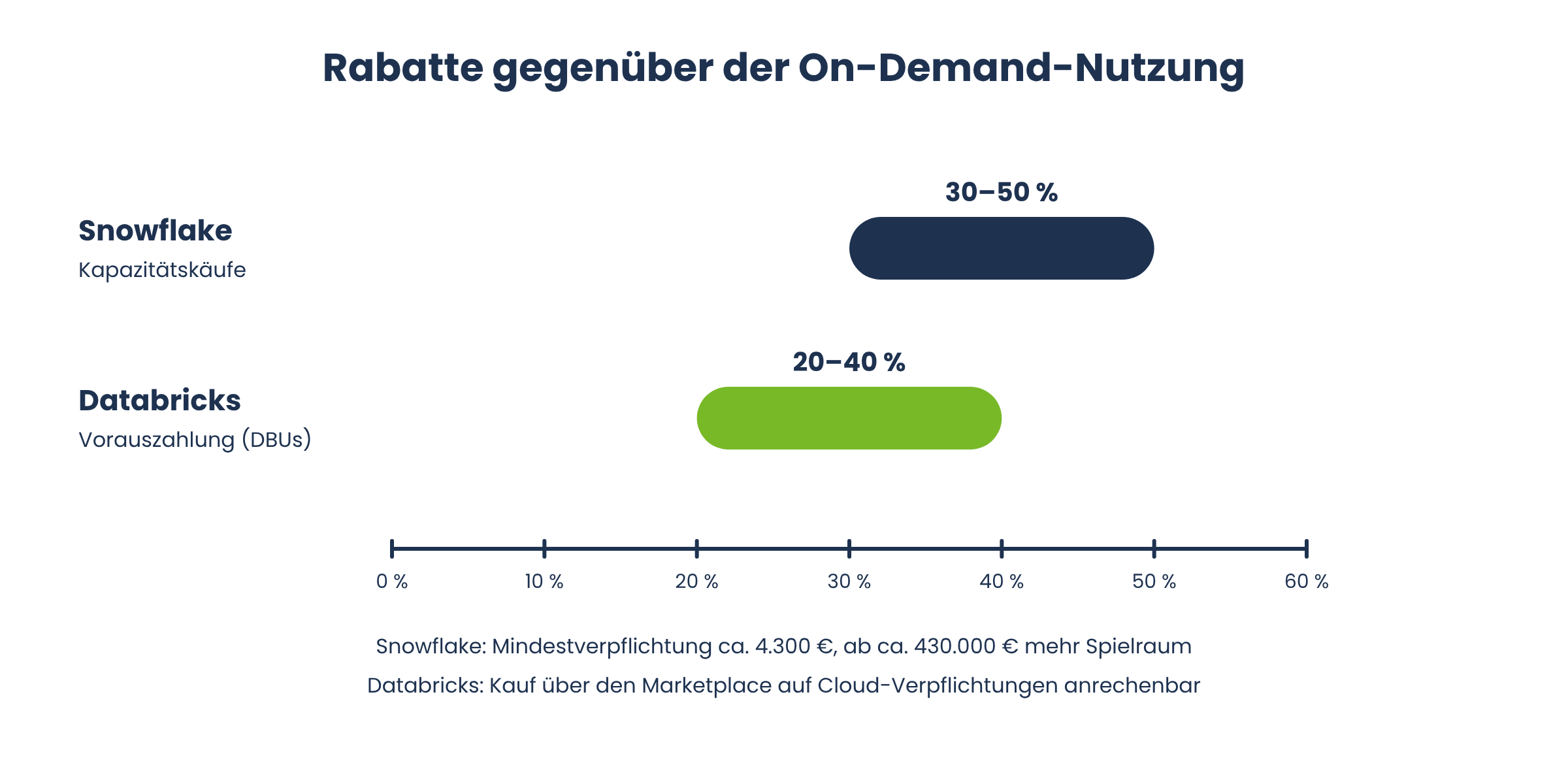
Snowflake can reduce costs by 30 to 50 percent through capacity purchases. The minimum commitment for capacity pricing is typically around 4,300 euros; larger annual commitments starting at approximately 430,000 euros open up additional commercial flexibility and provide a dedicated account manager (Software Pricing Guide).
Discounts and Prepaid Models at Databricks
Databricks offers 20 to 40 percent discounts on upfront payments for DBUs. Annual and multi-year prepaid agreements are the standard commercial model for enterprise customers. In addition, purchases made through the Databricks Marketplace on AWS, Azure, or GCP can often be applied toward existing cloud commitments, creating a further cost advantage (Software Pricing Guide).
Data Processing: Structured and Unstructured Data
A key difference between Databricks and Snowflake lies in the types of data that can be processed efficiently. Snowflake has historically specialized in structured data such as tables and traditional database formats, but now also supports semi-structured formats like JSON or XML and unstructured data such as images or videos. Databricks, on the other hand, is equally suited for structured and unstructured data: images, videos, free-form text, log files, and sensor data can be stored directly in the data lake and used for machine learning projects without first being converted into a fixed table schema.
What is Unity Catalog, and why is it important for Databricks?
Unity Catalog is Databricks’ central governance layer for data and AI assets. It provides a single place to control access rights, track data lineage, classify sensitive data, and monitor data quality across cloud boundaries (Databricks). Before Unity Catalog, companies often had to combine multiple governance tools—for example, for access control, data lineage, and compliance. Unity Catalog consolidates these functions and makes them controllable via standard SQL commands such as GRANT and REVOKE.
What is Delta Lake, and what role does it play in the Lakehouse approach?
Delta Lake is the open storage format on which the Databricks Lakehouse architecture is built. It extends traditional data lake formats with transactional consistency, versioning, and schema enforcement—features that were previously reserved primarily for traditional databases. For you, this means you can store large amounts of data in cost-effective cloud object storage without sacrificing the reliability of a traditional data warehouse.
Data Sharing: How Does Delta Sharing Work Compared to Snowflake's Data Sharing?
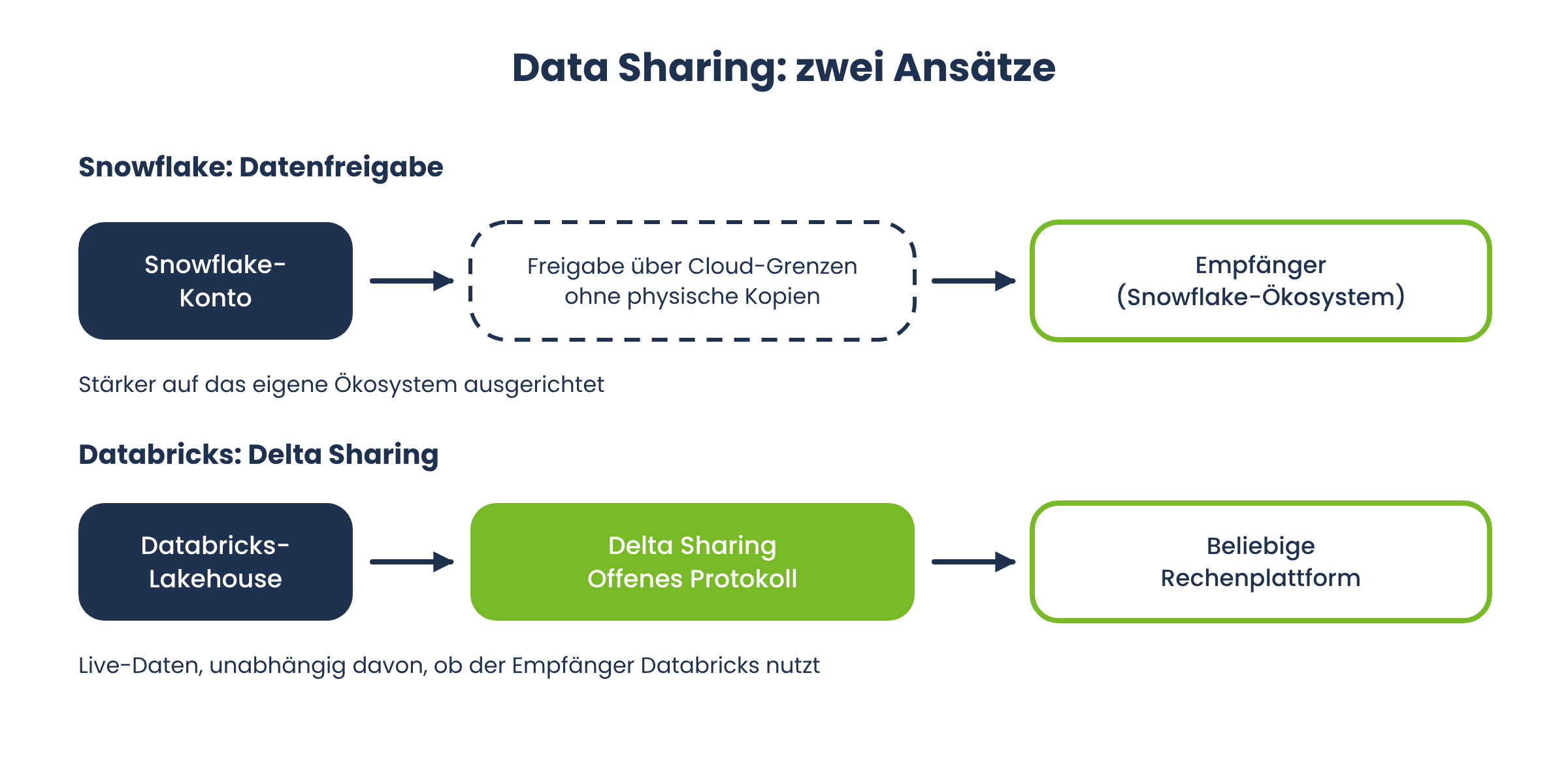
Both platforms place a high priority on secure data exchange between companies. Snowflake’s architecture enables seamless data sharing across cloud boundaries without the need to physically copy data. Databricks relies on Delta Sharing, an open protocol that allows live data from the Lakehouse to be shared with any other computing platform, regardless of whether the recipient uses Databricks itself. For companies that exchange data with partners, suppliers, or customers, this difference is relevant: Delta Sharing relies on an open standard, while Snowflake’s data sharing is more closely aligned with its own ecosystem.
Machine Learning and AI: Where Does Databricks Lead the Way?
Databricks grew out of Apache Spark and has integrated machine learning into the core of its platform from the very beginning. Databricks tends to be better suited for data-driven analytics with extensive ML components and, with MLflow, Feature Store, and Model Serving, offers an end-to-end environment for the entire machine learning lifecycle, from training to deployment. Snowflake has caught up in recent years with Cortex AI and Snowpark ML, but often remains at a disadvantage compared to Databricks’ native Spark environment when it comes to complex, custom-trained models and distributed training.
SQL Analytics and Business Intelligence: Snowflake's Strength
Snowflake is optimized for high-performance SQL queries and traditional business intelligence applications. If your team primarily works with SQL, builds dashboards, and performs ad hoc analyses, Snowflake offers a particularly low barrier to entry: Snowflake is designed for SQL-based business intelligence applications without requiring users to configure clusters or have Spark knowledge. This simplicity is one of the main reasons why many BI teams prefer Snowflake over Databricks.
Data Engineering and ETL/ELT Workloads
ETL and ELT—that is, extracting, transforming, and loading data—are among the most resource-intensive tasks in modern data infrastructure. Databricks is better suited for large-scale ETL pipelines and machine learning projects because native Spark support enables complex transformations to be processed in parallel. Databricks itself claims that, based on its own comparison, ETL workloads on Snowflake can be up to nine times more expensive than on the Databricks Lakehouse Platform—a figure that should be viewed as a vendor claim and varies significantly depending on the workload (Databricks). Regardless of the exact figure, ETL workloads often account for 50 percent or more of a company’s total data platform costs, which is why a thorough evaluation is always worthwhile.
Data Lakes and Data Warehouses: What's the Difference?
Data lakes and data warehouses follow different philosophies. A data warehouse stores pre-structured, cleaned data for reporting and analysis, while a data lake stores raw data in virtually any format and structure. Snowflake comes from the data warehouse tradition, while Databricks comes from the data lake world; however, the Lakehouse approach combines the governance of a warehouse with the flexibility of a lake. For many companies, it is precisely this combination that is the reason they opt for a Lakehouse approach instead of a traditional warehouse.
A Comparison of Governance and Security
Snowflake offers robust governance and data sharing capabilities, including role-based access control, dynamic data masking, and row-level security as standard features. With Unity Catalog, Databricks offers a similarly comprehensive level of governance that additionally treats AI models, functions, and agents as standalone, securable objects. For regulated industries such as insurance or the public sector, it is crucial that both platforms offer compliance certifications and fine-grained access controls, although the level of maturity varies depending on the selected pricing plan.
Cloud Infrastructure: Multi-cloud support on both platforms
Snowflake supports AWS, Azure, and GCP, allowing companies to use Snowflake regardless of their existing cloud provider. Databricks also integrates closely with cloud-native services and is available on all three major hyperscalers. Both platforms support the integration of distributed data sources, which is particularly relevant for companies with mature, heterogeneous IT landscapes. One difference remains: Databricks often integrates more closely with the native services of the respective cloud provider—such as Azure Data Lake Storage or AWS Glue—while Snowflake deliberately offers a consistent experience across all clouds.
Scalability: Virtual Warehouses vs. SQL Warehouses and Clusters
Snowflake scales using virtual warehouses that can be scaled up or down independently of one another in seconds without the need to redistribute data. Databricks scales using clusters and SQL warehouses that automatically add or remove additional nodes depending on the configuration. Both approaches are suitable for large-scale data processing, but differ in terms of fine-grained control: Snowflake warehouses are easier to configure, while Databricks clusters offer more control over instance types, autoscaling limits, and spot instances.
Programming Languages and Developer-Friendliness
Databricks supports various programming languages, including Python, Scala, R, and SQL, which can often be combined within the same notebook. This makes the platform particularly attractive for data science teams that work in different languages. Snowflake was primarily SQL-centric for a long time, but with Snowpark, it has added support for Python, Java, and Scala. For teams whose members primarily have SQL skills, Snowflake remains the more accessible platform.
Use Cases: Which Companies Are a Good Fit for Snowflake?
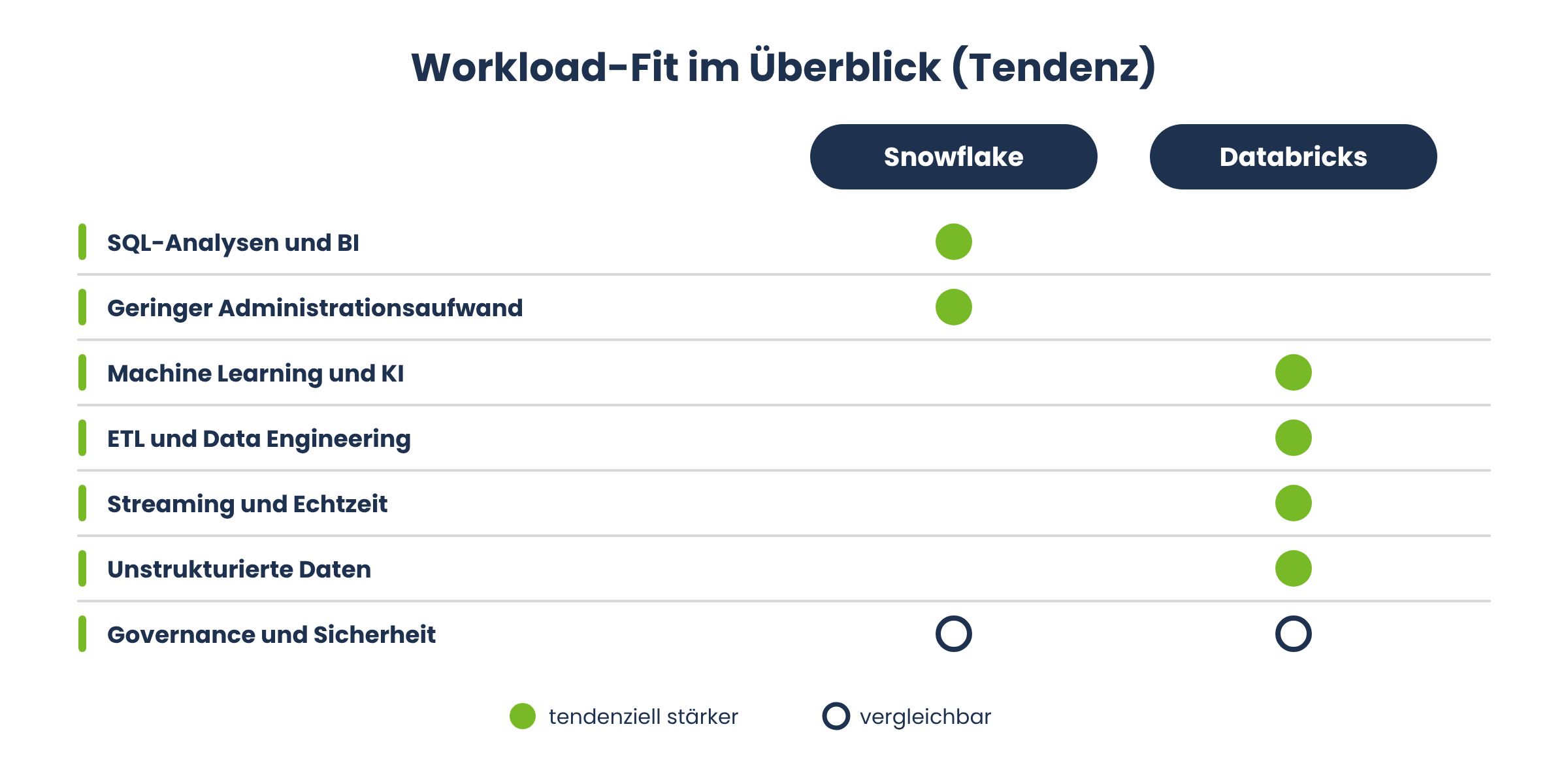
Snowflake is ideal for companies that want minimal infrastructure management and focus on SQL-based analytics, reporting, and data sharing. Typical use cases include:
Centralized BI reporting for multiple business units.
Data sharing with partners or subsidiaries without creating data copies.
Consolidation of multiple legacy systems into a central data warehouse.
Compliance-driven applications with high governance requirements.
Use Cases: Which Companies Are a Good Fit for Databricks?
Databricks is suitable for unstructured data and AI models, as well as for companies whose data strategy is heavily focused on machine learning, GenAI, and data engineering. Typical use cases include:
Training and running proprietary machine learning models.
Real-time processing of streaming data from IoT sensors or production facilities.
Building complex, multi-stage ETL pipelines for heterogeneous data sources.
Generative AI applications that are trained or fine-tuned using the company’s own data.
Case Study: A Retail Company Chooses Snowflake
A retail company with several hundred stores wants to centrally analyze daily sales data from various point-of-sale systems. The requirements are clearly defined: structured data, fixed reporting cycles, and many concurrent users in the controlling department. In this scenario, Snowflake stands out thanks to its ease of management, automatic scaling during peak loads at month-end, and the ability to share data directly with franchise partners without having to build additional integrations.
Case Study: An Industrial Company Relies on Databricks
An industrial company collects sensor data from production facilities to predict outages. The data is generated continuously, at a high frequency, and in various formats. This is where Databricks really shines: near-real-time streaming processing, native machine learning libraries for failure prediction, and the ability to store raw data directly in the data lake without prior reformatting.
Can companies use Databricks and Snowflake together?
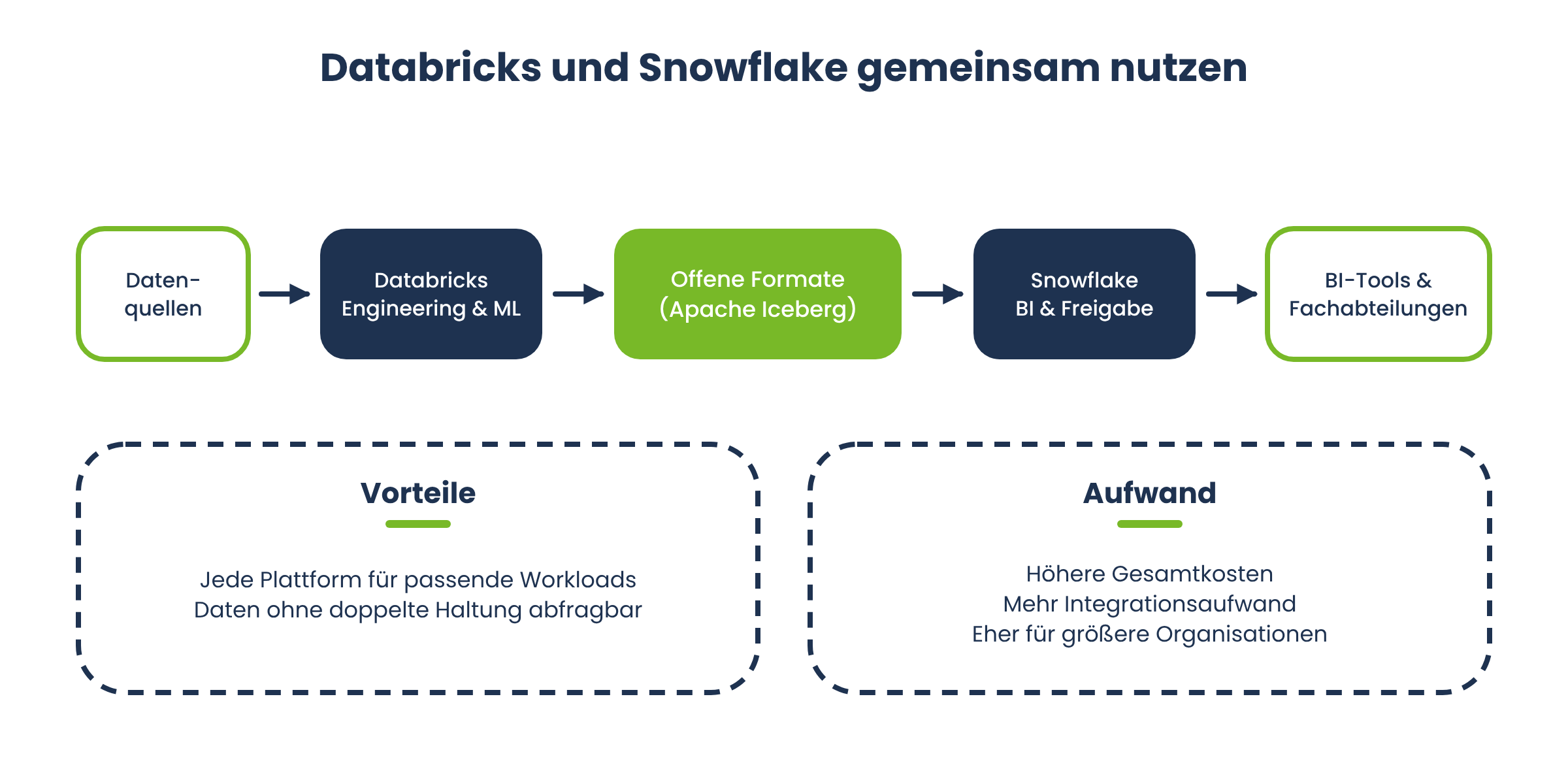
Yes, and in practice, this has become one of the most common architectural decisions. Databricks handles data engineering and machine learning training, while Snowflake provides the cleaned, governance-compliant data for BI tools and SQL-savvy business departments. Open table formats such as Apache Iceberg make it possible to query data directly between the two platforms without maintaining duplicate copies. This combination solves the problem of workload alignment, but it also increases overall costs and integration efforts, which is why it is particularly well-suited for larger organizations with the necessary resources.
Benefits of Snowflake at a Glance
Low administrative overhead thanks to a fully managed infrastructure.
High performance for traditional SQL and BI workloads.
Simple, secure data sharing across organizational boundaries.
Predictable costs thanks to automatic pausing of unused warehouses.
Broad support for AWS, Azure, and GCP.
Challenges with Snowflake
Limited native support for unstructured data.
Machine learning capabilities are less mature compared to Databricks.
Costs can rise quickly if multiple warehouses are used without proper control.
Some data-sharing features are tightly tied to Snowflake’s own ecosystem.
Benefits of Databricks at a Glance
A unified platform for data engineering, analytics, and machine learning.
Native support for structured and unstructured data.
Open formats such as Delta Lake and Delta Sharing reduce vendor lock-in.
High flexibility in programming languages and cluster configuration.
Well-suited for streaming and real-time use cases.
Challenges with Databricks
Greater configuration and administration effort for clusters.
DBU costs and cloud infrastructure costs must be calculated separately.
A steeper learning curve for teams without Spark or Python experience.
SQL experience may be somewhat less user-friendly for pure BI users than with Snowflake.
Best Practices for Choosing a Platform
No matter which platform you choose, following a few basic guidelines will help you make an informed decision:
First, analyze your actual workloads before comparing price lists.
Create a TCO spreadsheet that breaks down the cost of each component individually for your actual workload mix.
Test both platforms with a realistic proof of concept instead of relying solely on vendor benchmarks.
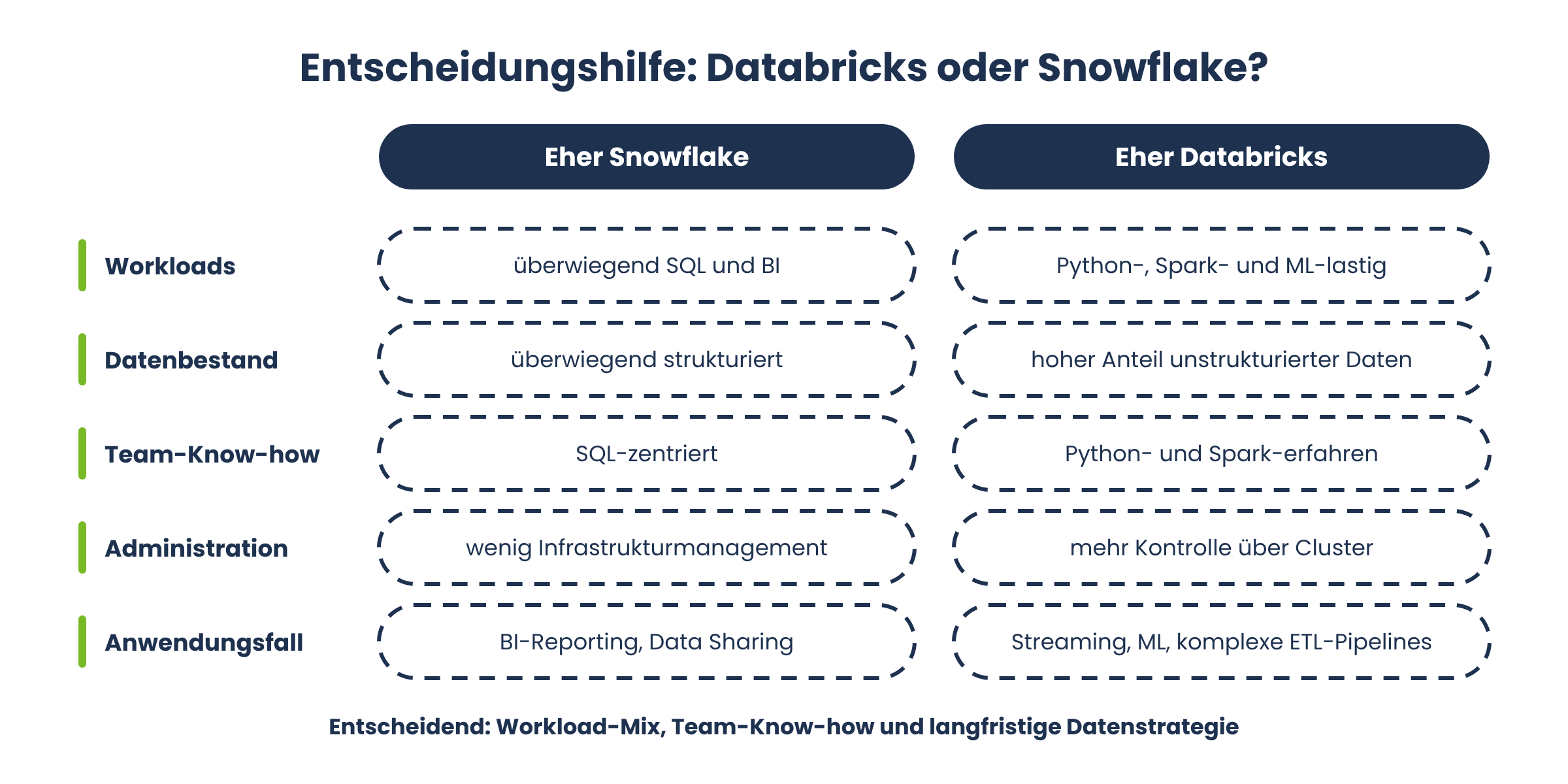
Consider your team’s existing expertise: SQL-focused teams often get up and running faster with Snowflake, while teams experienced with Python and Spark benefit more quickly from Databricks.
Plan for cost trends based on double the current data volume, not just the current level.
Checklist: How to Make the Right Decision
[ ] Are your workloads primarily SQL-based, or are they more Python- and ML-heavy?
[ ] What percentage of your data consists of unstructured data?
[ ] How important is secure data sharing with external partners to you?
[ ] What expertise does your team already have?
[ ] Have you calculated the costs for a realistic growth scenario?
[ ] Does either of the two platforms align with your existing cloud strategy?
Databricks or Snowflake—which is the right fit for your business?
Databricks and Snowflake are leading platforms in modern data management, but they follow different philosophies. Snowflake excels at traditional SQL analytics, business intelligence, and ease of management. Databricks excels at machine learning, complex data engineering, and processing unstructured data. There’s no one-size-fits-all answer to the question “Databricks or Snowflake”—the decision depends on your workload mix, your team’s expertise, and your long-term data strategy. Many companies are now using both platforms together anyway, rather than opting for a single solution.
If you’re unsure which data platform best suits your needs in the insurance, public sector, or SME environment, FIDA can help you analyze your workloads and develop a suitable data strategy. FIDA understands the requirements of regulated industries and helps you calculate the total cost of ownership realistically, rather than based on marketing promises.
Frequently Asked Questions About Databricks and Snowflake (FAQ)
There's no one-size-fits-all answer to that. For pure SQL and BI workloads, Snowflake is often more cost-effective, while Databricks frequently performs better for workloads heavy on machine learning and data engineering. The key factor is the specific mix of workloads, not the list price.
Yes, with Snowpark ML and Cortex AI, Snowflake now offers its own machine learning capabilities. This is often sufficient for simple to moderate ML use cases, but for complex, distributed training, Databricks generally remains more powerful due to its native Spark environment.
A data warehouse stores pre-structured data for reporting and analysis. A data lakehouse—Databricks' approach—combines the flexibility of a data lake for structured and unstructured data with the governance and reliability of a traditional data warehouse.
A DBU measures the computing capacity consumed by a cluster or job per hour. The DBU rate varies depending on the cluster type, workload, and selected pricing plan, and is billed in addition to the cloud infrastructure costs charged by the respective cloud provider.
Yes, both Snowflake and Databricks run on all three major hyperscalers and offer multi-cloud support for integrating distributed data sources.
For large-scale, complex ETL and ELT pipelines, Databricks typically offers greater flexibility and better performance thanks to its native Spark support. Snowflake is well-suited for simpler transformations in an SQL context, but reaches its limits more quickly when dealing with highly complex pipelines.
For larger organizations with different teams and requirements, yes: Databricks for data engineering and machine learning, Snowflake for BI and data sharing. For smaller companies, however, running these systems in parallel increases costs and complexity and should be carefully considered.
A migration typically requires a thorough analysis of existing pipelines, data models, and access rights. Open formats such as Apache Iceberg facilitate the transition because data can be queried between the two platforms without having to be completely restructured. A phased migration with parallel operation reduces the risk compared to a hard switch.
For small and medium-sized businesses with limited IT resources, Snowflake is often the easier option to get started with, thanks to its lower administrative overhead. However, once machine learning projects or the processing of large, unstructured data sets come into play, it’s worth taking a closer look at Databricks—especially if the team has the necessary expertise.


