
Run AI locally: How to work independently of cloud providers
Artificial intelligence has long since arrived in everyday working life - usually provided by cloud services that are quickly available and easy to use. However, not every company wants to transfer sensitive data to external providers or be permanently tied to a platform. This is exactly where the local use of AI comes into play, because local AI systems support human work in tasks such as text summarization, translation or learning processes without replacing them.
When you run AI locally, models and applications run directly on your own infrastructure - be it on a server in the company or even on powerful hardware at your workplace. This not only gives you more control over your data, but also over costs, performance and customization. Today, operating local AI is no longer something that only large companies or IT departments can implement - smaller players can also operate their own AI servers and benefit from them.
In this article, you will get a concise overview of what it means to operate AI locally, what advantages and challenges are associated with it and for which use cases this approach is particularly suitable. Already know what you want? Then contact us directly and together we can implement the use cases with locally operated AI!
What does running AI locally mean?
When you run AI locally, this means that the underlying models and applications are executed directly on your own infrastructure - i.e. on local servers, in the company's own data center or on dedicated hardware on site. This contrasts with cloud-based solutions, where processing is carried out by external providers.
The key difference lies in where your data is processed. With locally operated AI, all inputs, evaluations and results remain within your own IT environment. This means that you do not pass on any sensitive information to third parties and retain full control over data flows and access rights.
In technical terms, local operation comprises various components: the provision of suitable hardware (e.g. GPUs), the installation of AI models and integration into existing systems and processes. Depending on the use case, these can be pre-trained models or individually customized solutions.
In short: operating AI locally means using artificial intelligence independently of external cloud services - with more control, but also with more responsibility for operation and maintenance.
Typical use cases for local AI
Local AI delivers its greatest added value where sensitive data is processed or processes are highly company-specific. The following use cases illustrate the practical use of local AI using concrete examples. Practical and quickly implementable use cases arise in these areas in particular:
Internal knowledge databases and chatbots
Local AI is ideal for building internal chatbots that access company knowledge. Employees can ask questions about processes, guidelines or documentation directly without having to use external systems. This creates centralized, secure access to knowledge within the company.

Document analysis of contracts and reports
Another common area of application is the analysis of large volumes of documents. AI can automatically evaluate contracts, reports or technical documentation, summarize content and extract relevant information. Running the AI locally offers great advantages, especially for sensitive documents, as the documents do not leave the company and therefore data protection and control remain guaranteed. This saves time and significantly reduces manual effort.

Support automation on the intranet
In internal support, AI can answer recurring queries automatically - for example on IT topics, HR processes or internal tools. This reduces the workload of support teams and standard queries are processed more quickly.

Code assistance for developers
Local AI also offers advantages in software development. It can support developers in code creation, error analysis or documentation without sensitive source code leaving external systems.

Classification of company data
Local AI can automatically categorize, structure and tag data. This is particularly helpful with large data sets, for example in CRM systems, email archives or document management systems.
What are the reasons for operating AI locally?
The local operation of AI brings with it a number of advantages and opens up a wide range of possibilities for how AI models can be used flexibly and in line with requirements, which vary in importance depending on the use case and company requirements. The most important aspects at a glance:
Reason #1: More data protection and data sovereignty
One of the key reasons for local AI is the protection of sensitive data. If you operate AI on your own infrastructure, all information remains within your IT environment. This reduces the risk of data leaks and makes it easier to adhere to data protection regulations and compliance guidelines.
Reason #2: Full control over systems and processes
With local operation, you decide how the AI is used, which data is processed and who has access. You are not dependent on the specifications or changes of a cloud provider and can customize systems individually.
Reason #3: Independence from external providers
Cloud services are often associated with a long-term commitment. Local AI solutions give you the opportunity to work independently and develop your own technologies flexibly without having to react to price changes or restrictions.
Reason #4: Better cost control with long-term use
While cloud solutions often incur usage-based costs, with local AI you primarily make an initial investment in hardware and setup. With regular and intensive use, this can pay off economically in the long term.
Reason #5: High performance and low latency
As processing takes place directly on site, there are no transfer times to external data centers. This can lead to faster response times, especially for time-critical applications.
Reason #6: Customizability of AI solutions
Local AI systems can be specifically adapted to your requirements - for example with your own training data, special interfaces or customized workflows. This allows you to develop solutions that fit your processes exactly.
Reason #7: Independence from an internet connection
Another advantage: local AI works independently of the internet and does not require a constant internet connection. This is particularly relevant in sensitive environments or in scenarios with limited connectivity. Even in the event of an internet outage, local AI systems remain fully functional.
Overall, local operation of AI offers clear advantages, especially where control, data protection and individual customization are paramount.
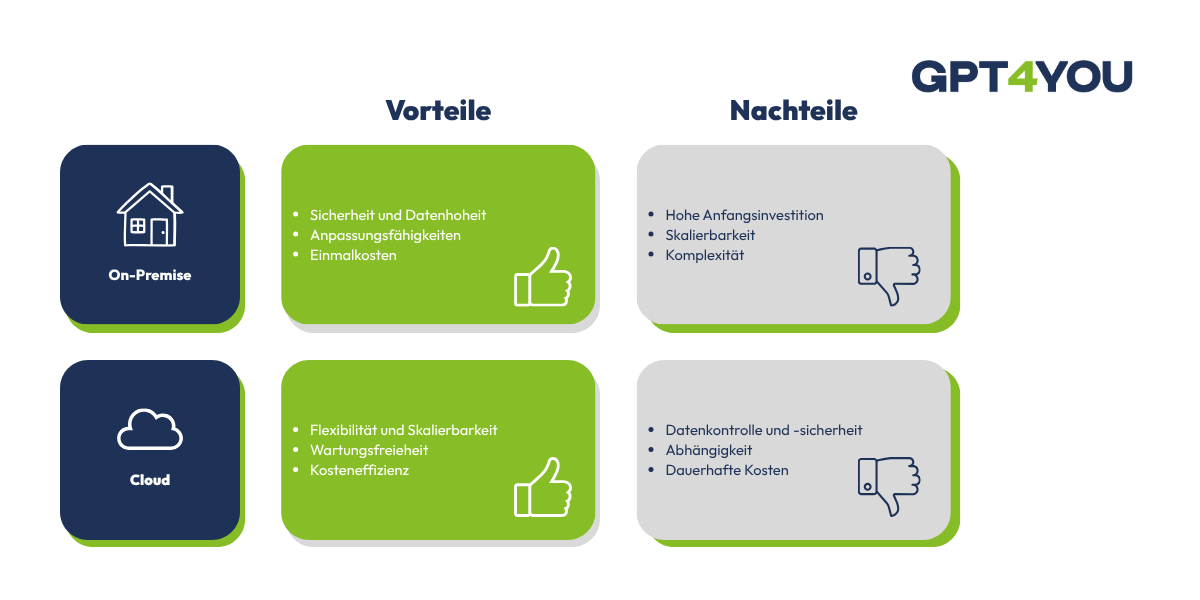
Local AI vs. cloud AI in direct comparison
The decision between local AI and other AI systems such as cloud AI depends heavily on a company's individual requirements. Both approaches have clear strengths and weaknesses:
Cost structure
Cloud AI is usually based on usage-based fees, while local AI requires higher initial investments in hardware and setup. In the long term, local operation can be economically viable with high usage.
Data protection
With local AI, all data remains within the company, which enables maximum control and data sovereignty. Cloud AI processes data outside your own infrastructure, which can pose regulatory challenges depending on the industry.
Performance and latency
Local AI generally offers lower latency, as no data needs to be transferred to external servers. Cloud solutions, on the other hand, are dependent on the internet connection and server load.
Flexibility
Cloud AI is quickly ready for use and easily scalable. Local AI offers significantly more customization options and control over models, data and processes.
Maintenance effort
With cloud AI, the provider takes care of maintenance, updates and operation. With local AI, this effort is the responsibility of the company itself, which requires additional technical resources.
GPT4YOU is the ideal solution for local AI operations
GPT4YOU provides you with a solution that has been specifically developed for the flexible and secure use of AI in companies and is particularly suitable for local operation. A key advantage is the ability to operate the platform completely on-premise on your own infrastructure. This allows you to retain full control over your data while meeting high data protection and compliance requirements.
Another advantage is the technical flexibility: you can integrate different AI models and select them depending on the use case. At the same time, the platform can be individually adapted to your processes and requirements - from user roles to the user interface and your use cases.
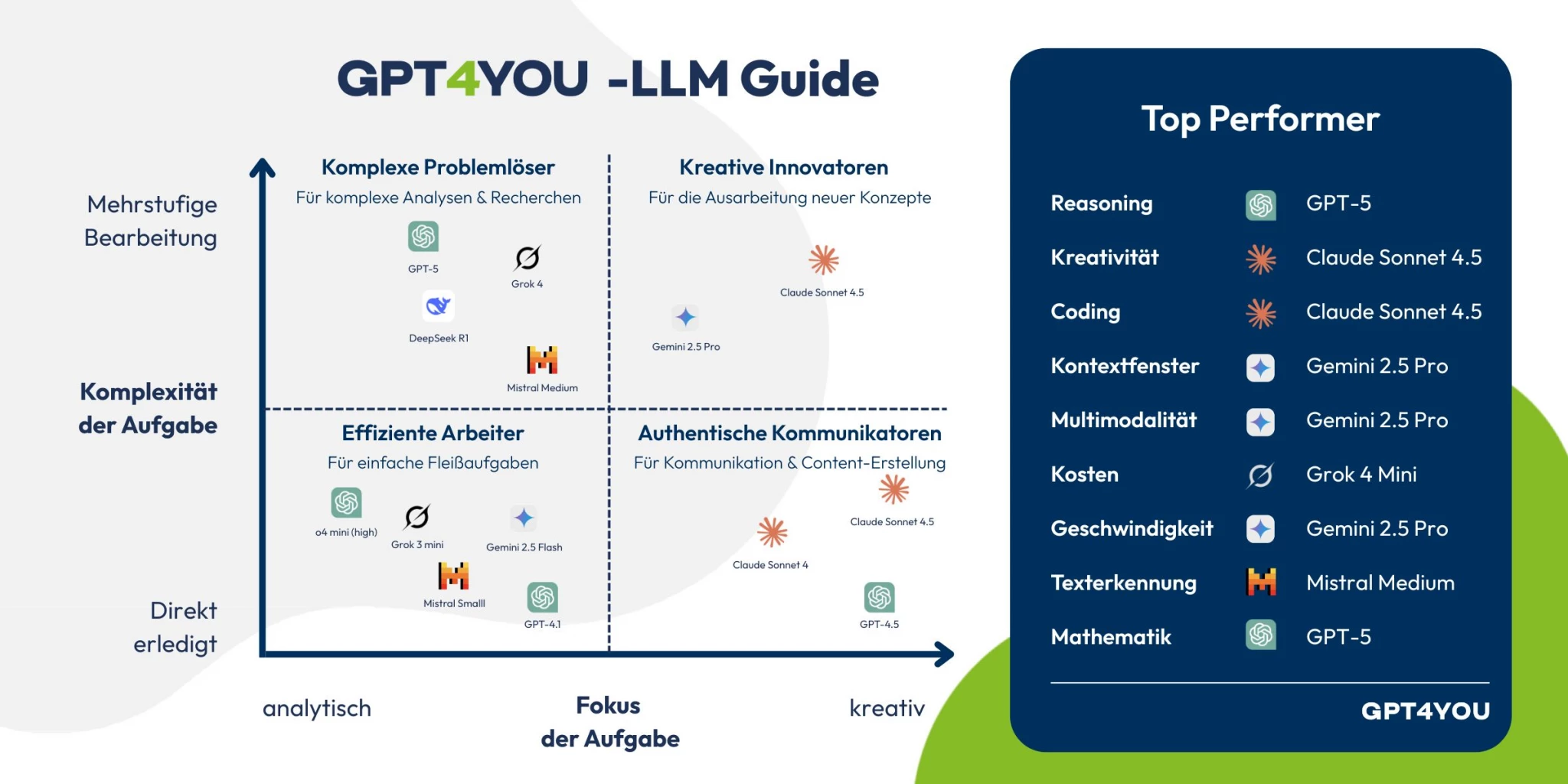
Which LLMs are suitable for local operation with GPT4YOU?
Many well-known commercial LLMs run primarily in the cloud, but can be connected to GPT4YOU and used locally.
ChatGPT (OpenAI)
ChatGPT is one of the most powerful AI systems, but cannot be operated locally without GPT4YOU.
Advantages: Very high quality, versatile, strong API integration
Disadvantages: No on-premise operation, external data processing
Use: Integration into existing applications via interfaces
Claude (Anthropic)
Claude is also a cloud-based LLM with a focus on long, structured texts and analyses. With GPT4YOU you can use Claude locally without any problems!
Advantages: Very good text comprehension and analysis capabilities
Disadvantages: No local operation possible
Use: Knowledge work and text analysis
DeepSeek
DeepSeek offers models, some of which are available as open weights and can be operated locally.
Advantages: Can be used locally, good performance with moderate resource requirements
Disadvantages: Different model quality depending on the version
Use: Self-hosting and individual AI solutions
What hardware do you need for local operation of AI?
The hardware requirements depend heavily on the type of AI you want to use and how intensively it will be used. For simple use cases, such as smaller models or initial tests, a powerful desktop PC with a modern CPU and sufficient RAM may be sufficient.
However, as soon as you want to run larger AI models - such as language models or image processing systems - locally, the graphics card (GPU) plays a crucial role. GPUs are specialized in executing many computing operations in parallel, which is essential for AI applications. Sufficient video memory (VRAM) and good support from common frameworks are particularly important here.
In addition to the GPU, you should also make sure you have enough RAM, as many models require additional memory resources. Dedicated servers or workstations that are specially designed for computing-intensive applications are often used for productive environments.
Storage space should also not be underestimated: AI models can be several gigabytes in size, plus training data, logs and other system components. Fast SSDs ensure shorter loading times and better overall performance.
In summary, the more complex and powerful the AI you want to use, the higher the demands on your hardware. Careful planning will help you to set up the right infrastructure for your use case.
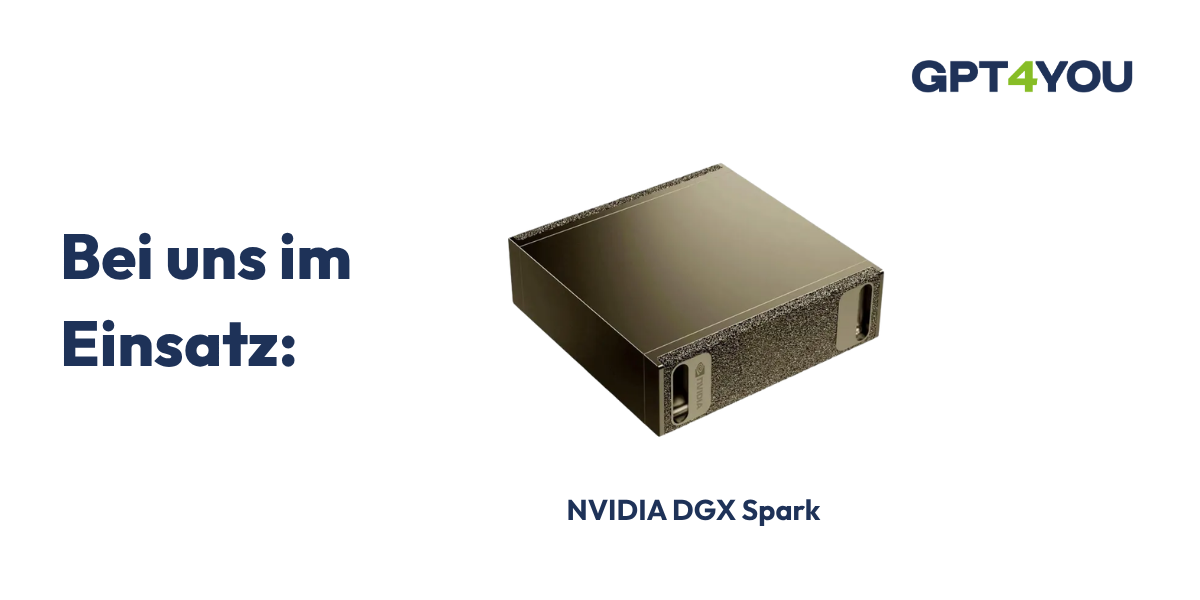
Example: Setup for a small company
A compact but powerful workstation is often sufficient for smaller companies or initial pilot projects:
CPU: Current multi-core processor (e.g. 8-16 cores)
GPU: Mid-range graphics card with 16 GB VRAM
RAM: 32-64 GB
Storage: 1-2 TB SSD (preferably NVMe)
Use:
Local chatbots
Text processing with smaller language models
First automations and analyses
This setup is well suited to gaining experience, using smaller AI applications productively and optimizing initial processes - without having to invest directly in complex infrastructure.
Example: Setup for a larger company
A dedicated server solution is recommended for larger companies with intensive use or several parallel applications:
CPU: High-performance server processor (e.g. 16-64 cores)
GPU: One or more high-end GPUs with 24+ GB VRAM
RAM: 128-512 GB
Storage: 4-10 TB SSD (NVMe, possibly supplemented by network storage)
Network: Fast internal connection (e.g. 10 Gbit)
Use:
Operation of larger language models
Processing large amounts of data
Multiple simultaneous users and applications
Integration into existing company systems
Such a setup offers the necessary performance and scalability to firmly integrate AI into business processes and make it usable company-wide.

How FIDA supports you as an AI partner
FIDA provides holistic support for the introduction and operation of artificial intelligence in your company - from strategy to technical implementation.
AI consulting and strategic classification
In the first step, we start with in-depth AI consulting. Together, we analyze requirements, identify potential areas of application and define sensible scenarios for the use of local or hybrid AI solutions.
Implementation of individual AI use cases
Building on this, we identify individual use cases that are to be accelerated with AI in the future. The aim is not to view AI in isolation, but to integrate it directly into existing processes and systems.
Support in selecting hardware for local operation
A key success factor for local AI is the right infrastructure. FIDA supports you in the selection of suitable hardware, tailored to performance requirements, scalability and budget.
Installation and integration of AI models
The technical implementation includes the installation and configuration of suitable AI models and their integration into your existing IT environment. This results in a stable and production-ready solution for daily use.
Training and enablement
The FIDAcademy offers practical AI training courses so that AI can be used successfully in the company. Both technical basics and specific use cases are taught so that teams can use AI safely and efficiently.
Operating AI locally as a strategic competitive advantage
The local operation of AI offers companies the opportunity to integrate artificial intelligence independently, securely and individually into their own IT landscape. This approach unfolds its full potential, especially where data protection, control over data and customized applications are paramount. At the same time, it requires careful planning in terms of hardware, model selection and technical implementation.
Whether internal chatbots, document analysis or process automation - local AI opens up a wide range of possible applications that can be tailored directly to the needs of your company. Local AI models can, for example, summarize text, translate, provide learning assistance or explain content, whereby the critical review of the results always remains with humans. However, locally operated AIs often reach their limits with very long texts, as they do not always have the necessary computing power and memory to fully process large documents. The use of local AI models also minimizes the risk in terms of data protection and data security, which is a decisive advantage, especially for companies and private individuals with sensitive data. Compared to the cloud, it is particularly impressive in terms of data sovereignty and flexibility, but also entails higher requirements in terms of operation and expertise.
If you want to find out how AI can be used in your company, FIDA will support you from the initial idea to the productive solution. From strategic consulting and the selection of suitable hardware to technical implementation and training, you get everything from a single source.
FAQ - Operating AI locally
Operating AI locally means that models and applications are not executed in the cloud, but on your own infrastructure. Data processing takes place entirely within the company, for example on local servers or workstations.
The biggest advantage is data sovereignty, as no sensitive information is transferred to external providers. You also benefit from more control, lower latency and individual customization options. Cloud AI is ready to go more quickly and is easier to scale.
It depends on the application. A powerful workstation is often sufficient for smaller models. For larger AI models, GPUs with a lot of VRAM, sufficient RAM (from 64 GB) and fast SSDs are required. Dedicated servers are used in larger environments.
Open-weight models such as DeepSeek or other freely available LLMs are particularly suitable. Commercial models such as ChatGPT, Claude or Gemini are predominantly cloud-based and can only be integrated via interfaces.
Yes, local AI can be operated particularly well in compliance with the GDPR, as data remains within the company. However, this requires internal security and access guidelines to be implemented correctly.
Local AI is particularly suitable for companies that work with sensitive data or have high data protection and control requirements. Typical sectors include industry, finance, administration and IT-related service providers.
Getting started requires a certain amount of technical planning, especially when it comes to hardware and model selection. However, with a clearly defined use case and professional support, getting started can be well structured and implemented step by step.


